Star Wars Battlefront 2 PC
Experience epic Star Wars battles, iconic heroes, and stunning visuals in Star Wars Battlefront 2 PC. Fight across galaxies with immersive action and rich gameplay.
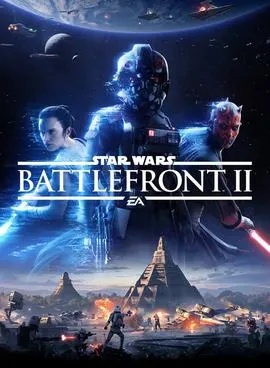
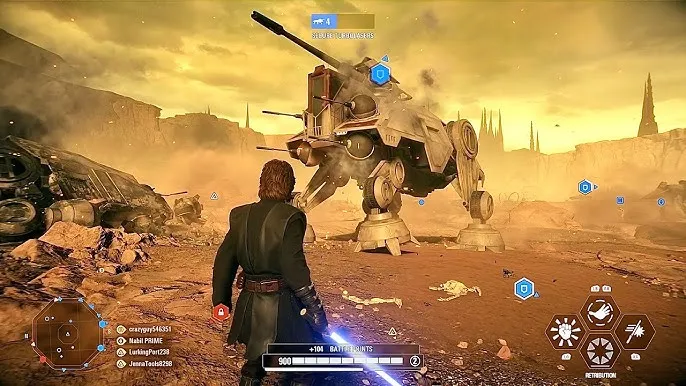
Star Wars Battlefront 2 PC stands as one of the most visually stunning and action-packed shooter experiences ever created in the Star Wars gaming universe. Developed by DICE and published by Electronic Arts (EA) in collaboration with Lucasfilm, the game brings to life the unforgettable battles, iconic characters, and galactic warfare that fans have dreamed of for decades. From massive ground assaults across famous Star Wars planets to intense space dogfights in the galaxy’s most legendary starfighters, the game delivers cinematic action powered by the world-class Frostbite Engine. Its polished visuals, rich sound design, and authentic Star Wars atmosphere contributed to its global popularity, attracting millions of players across platforms. What makes the experience even more immersive are the playable heroes and villains Darth Vader, Rey, Kylo Ren, Yoda, and many others each offering unique abilities that reshape the battlefield and bring iconic movie moments into an interactive form.
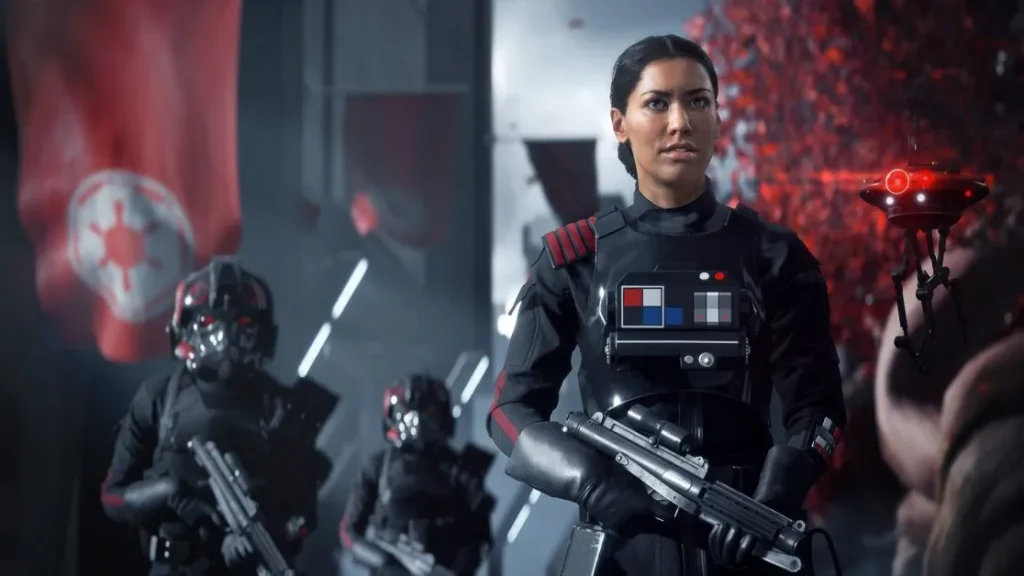
Part of the game’s long-lasting appeal comes from its massive scope and dynamic gameplay. Whether you’re fighting as clone troopers during the Clone Wars, battling stormtroopers in the Galactic Empire era, or joining the Resistance and First Order battles from the sequel trilogy, Battlefront 2 beautifully combines all three eras of the Star Wars saga into one seamless experience. The multiplayer modes such as Galactic Assault, Starfighter Assault, Supremacy, and Heroes vs. Villains offer fast-paced gameplay and thrilling team-based objectives that turn every match into an epic movie-like scenario. The story-driven single-player campaign centered around Iden Versio of the Inferno Squad also delivers an emotional and action-packed narrative that bridges events between Return of the Jedi and The Force Awakens. With frequent free content updates and community-driven improvements since its launch, the game has grown into one of the most well-balanced and content-rich Star Wars titles ever made.
Many players now prefer the Star Wars Battlefront 2 PC version because the platform offers a smoother, more customizable, and visually enhanced experience. On PC, you can enjoy ultra-high graphics settings, faster loading times, and the freedom to fine-tune performance for your hardware. Playing on a larger screen amplifies the cinematic feel, while keyboard and mouse controls offer precision aiming and quick reactions ideal for competitive multiplayer matches. PC gaming also removes limitations such as battery drain and overheating, giving players long, uninterrupted play sessions. With options like cross-progress syncing through EA accounts, mod support, and superior graphics, the PC version stands as the definitive way to experience the game. If you’re ready to dive into massive battles across Hoth, Naboo, Jakku, and more, you can easily download Star Wars Battlefront 2 PC using the safe download button available on this page and begin your journey in a galaxy far, far away.
Gameplay Overview
Star Wars Battlefront 2 PC offers fast-paced combat across ground battles, aerial dogfights, and hero-focused duels. Players can choose from a variety of classes such as Assault, Heavy, Officer, or Specialist, each offering unique weapons and abilities. You engage in massive multiplayer battles with up to 40 players, fight wars across planets, capture objectives, defend territories, and participate in full-scale galactic conflicts. The game also includes a story-driven single-player campaign following Iden Versio, a commander of the Inferno Squad, offering a compelling journey through the Star Wars timeline.
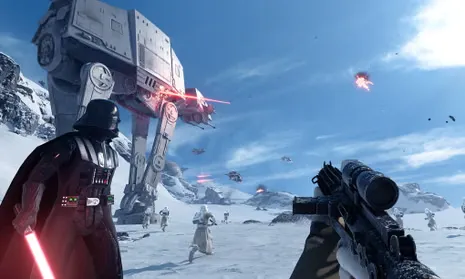
Multiplayer modes remain the heart of the experience. Galactic Assault pits players in iconic locations while Starfighter Assault offers intense spaceship combat in classic ships like the X-Wing, TIE Fighter, and Millennium Falcon. Heroes vs. Villains lets you battle as iconic characters like Darth Maul, Luke Skywalker, Rey, and Kylo Ren. The gameplay is fast, tactical, and incredibly cinematic, making every match feel like a scene from a Star Wars movie. With the PC version’s enhanced performance and visual improvements, every detail from laser blasts to explosions feels more immersive and dynamic.
Key Features
1. Iconic Heroes & Villains Gameplay
One of the most exciting features of Star Wars Battlefront 2 PC is the ability to play as legendary characters from all eras of the Star Wars universe. Heroes like Luke Skywalker, Yoda, Rey, and Obi-Wan Kenobi bring speed, agility, and powerful Force abilities, while villains such as Darth Vader, Kylo Ren, Darth Maul, and Emperor Palpatine deliver devastating strength and dark-side attacks. Each hero has unique abilities and a specialized combat style, allowing you to master different strategies in battle. This hero system adds depth and variety, making every match feel fresh and cinematic.
2. Massive 40-Player Multiplayer Battles
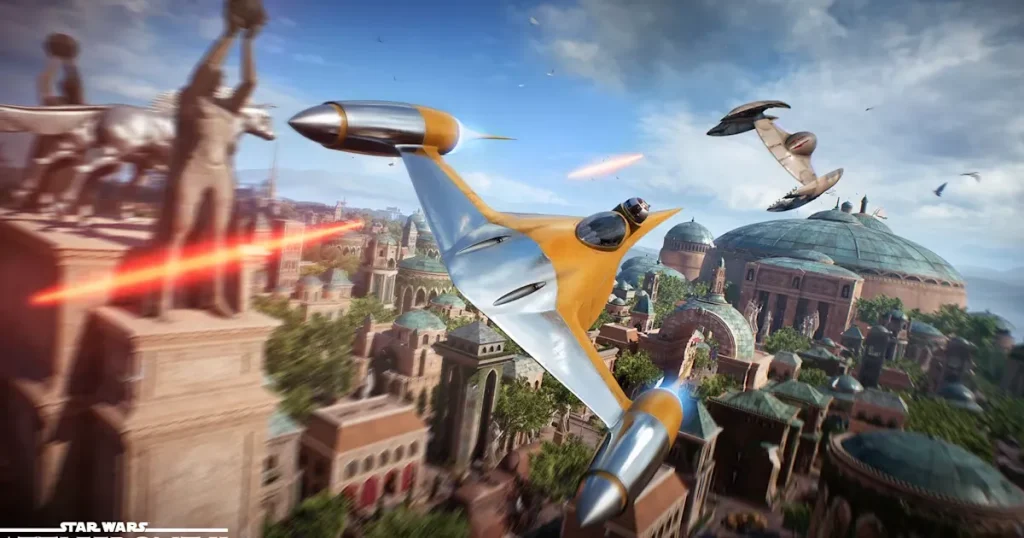
Battlefront 2 is famous for its large-scale multiplayer game modes, especially Galactic Assault and Supremacy, where up to 40 players fight across massive battlegrounds inspired by the Star Wars movies. Players capture objectives, escort vehicles, defend bases, and participate in evolving stages of battle. From storming the palace on Naboo to defending Echo Base on Hoth, the large maps and chaotic combat deliver epic moments that feel like real scenes from the films. New players will appreciate how easy it is to join battles and contribute to their team’s success.
3. Stunning Graphics Powered by Frostbite Engine
The game uses the advanced Frostbite Engine, offering ultra-realistic environments, lifelike character models, and high-quality lighting effects. Blaster bolts glow through smoke, lightsabers illuminate dark hallways, and explosions shake the ground with cinematic intensity. On the Star Wars Battlefront 2 PC version, players can unlock higher resolutions, smoother framerates, and more detailed textures. Every battle whether on Endor’s forests or Kamino’s rainy platforms feels visually breathtaking.
4. Deep Class-Based Combat System
Players can choose from four main classes: Assault, Heavy, Officer, and Specialist. Each class has unique weapons, gadgets, and abilities designed for specific playstyles. Assault troopers excel in close combat, Heavy troopers provide strong defenses, Officers support teammates with buffs, and Specialists handle long-range sniping. This class system helps new players experiment and find a role that suits their strengths. The game also includes vehicle classes and elite troopers for added tactical options.
5. Epic Space Battles in Starfighter Assault
For players who enjoy aerial combat, Starfighter Assault offers thrilling dogfights in iconic ships. Fly the X-Wing, TIE Fighter, Slave I, or the Millennium Falcon in fast, skill-based combat. Missions may include destroying capital ships, protecting cruisers, or controlling space sectors. The space maps are large and visually impressive, providing a completely different gameplay experience from ground battles.
6. Story-Driven Single Player Campaign
Battlefront 2 includes a full single-player campaign following Iden Versio, commander of the Imperial special forces unit known as the Inferno Squad. The story explores the fall of the Empire and connects key events between Return of the Jedi and The Force Awakens. With cinematic cutscenes and emotional character arcs, this campaign is perfect for players who enjoy narrative-driven gameplay.
7. Extensive Customization & Progression System
Players can upgrade characters and vehicles using Star Cards, which modify abilities and stats. The progression system allows you to unlock new weapons, outfits, emotes, hero skins, and advanced upgrades as you level up. This keeps gameplay rewarding and motivates players to improve each class or hero over time. The PC version also supports cosmetic mods, allowing even more creative customization.
Why Play Star Wars Battlefront 2 on PC?
Playing Star Wars Battlefront 2 on PC offers a dramatically enhanced experience compared to consoles or mobile alternatives, especially in terms of graphics, performance, and control precision. The PC platform allows players to enjoy the game at higher resolutions, faster framerates, and ultra-level graphical settings that showcase the full power of the Frostbite engine. Lighting effects, character detail, and environmental textures appear sharper and more realistic, making every blaster shot, lightsaber swing, and explosion feel more cinematic. Additionally, PC hardware allows players to adjust visual and performance settings to create a personalized and optimized gaming experience. There’s no worry about lag from overheating devices or battery life limitations, ensuring long, uninterrupted gaming sessions. With SSD support, loading times are significantly faster, helping players jump straight into action without delays.
Another major advantage of the Star Wars Battlefront 2 PC version is the superior control system. Keyboard and mouse inputs provide fast, accurate aiming and responsive movement critical advantages in fast-paced shooter gameplay. Whether you’re sniping as a Specialist or battling in close quarters as a Heavy Trooper, precision controls give PC players a competitive edge. PC gaming also offers convenient multitasking, allowing players to switch between the game, Discord, browsers, and other applications effortlessly. Additionally, progress syncing through EA accounts ensures your achievements, levels, and unlocks stay updated across devices. The PC community is also known for its creativity, offering mods that enhance graphics, change character models, or add new cosmetic upgrades to refresh the experience. Combined with better performance, smoother gameplay, and unmatched customization options, playing Star Wars Battlefront 2 on computer is hands-down the most immersive and enjoyable way to experience the galactic conflicts of the Star Wars universe.
How to Download Star Wars Battlefront 2 on PC
Here is a step by step guide to download Star Wars Battlefront on PC;
- Find the button: Scroll to the “Download Star Wars Battlefront for PC” button on this page.
- Start the safe download: Click the button to begin the safe download from this page. When prompted, choose Save (not Open) and pick a familiar folder (e.g., Downloads).
- Locate the file: When the download finishes, open your Downloads folder and find the .zip (or .rar) archive.
- Extract the game: Right-click the archive → Extract All… (or use 7-Zip/WinRAR) → choose a destination folder
- Open the folder: Go to the extracted folder and look for Star Wars Battlefront.exe
- Launch the game: Double-click the .exe to start. If Windows SmartScreen appears, select More info → Run anyway (only if you downloaded from the button on this page).
- Set up controls & video: In the Options/Settings menu, choose your resolution/fullscreen, adjust audio latency, and confirm keyboard bindings (← → ↑ ↓).
- Create a shortcut (optional): Right-click Star Wars Battlefront.exe → Send to → Desktop (create shortcut) for quick access.
- Play & enjoy: Start Story Mode or Free Play, and you’re good to go!
How to Play Star Wars Battlefront 2 on PC
Learning how to play Star Wars Battlefront 2 on PC is all about understanding the controls, game modes, and class system so you can adapt quickly and perform well in battle. After launching the game, start by exploring the Settings menu to adjust graphics, sensitivity, key bindings, and accessibility options. Lower the sensitivity for more accurate aiming or increase it for faster movement depending on your playstyle. Beginners should begin with the single-player campaign or Arcade Mode to practice blaster mechanics, movement, rolling, blocking, and using abilities. These modes help you learn how each class Assault, Heavy, Officer, and Specialist functions in different situations. Try all four classes to discover which best suits your strategy, whether that’s front-line rushing, defensive tanking, long-range sniping, or team support. Additionally, learn how to use Star Cards, which allow you to boost abilities, strengthen weapons, or customize your gameplay style.
Once you are familiar with the mechanics, you can jump into the core multiplayer modes such as Galactic Assault, Heroes vs. Villains, Supremacy, and Starfighter Assault. In multiplayer, teamwork is essential. Stick with your squad to gain extra battle points, which you can later use to unlock heroes, villains, or elite classes during the match. Always play the objective capturing command posts, guarding transports, or destroying key targets will earn you more points and help your team win. As you gain experience, upgrade your Star Cards and weapons to improve accuracy, damage, and character performance. If you enjoy aerial combat, spend time in Starfighter Assault to master iconic ships like X-Wings, TIE Fighters, and the Millennium Falcon. With practice, strategy, and smart loadout choices, you’ll quickly become a skilled and confident player in the Star Wars Battlefront 2 PC version, ready to dominate in every mode.
System Requirements
Minimum Requirements:
- OS: Windows 7/8.1/10
- CPU: Intel i5 6600K or FX 6350
- RAM: 8GB
- GPU: GTX 660 or Radeon HD 7850
- Storage: 60GB
Recommended Requirements:
- OS: Windows 10/11
- CPU: Intel i7 6700 or Ryzen 7
- RAM: 16GB
- GPU: GTX 1060 or RX 480
- Storage: 60GB SSD
FAQs
Is Star Wars Battlefront 2 PC still active in 2025?
Yes, Star Wars Battlefront 2 PC is still very active in 2025, thanks to a strong and dedicated community of players worldwide. Although official updates from EA and DICE have slowed down, the player base remains steady due to active multiplayer servers, community events, and the game’s rich content library. Popular modes like Galactic Assault, Heroes vs. Villains, and Starfighter Assault consistently have available matches. PC players also benefit from mods, improved performance, and lower wait times since the platform has one of the game’s most engaged communities.
Can I run Star Wars Battlefront 2 on a low-end PC?
Yes, you can run the game on lower-end hardware as long as your system meets the minimum requirements. By lowering graphics settings such as shadows, textures, and resolution scale, you can significantly improve performance. Many low-end PC users successfully play on 720p with adjusted settings. However, for the best experience especially in large 40-player battles having recommended or mid-range hardware is ideal.
Does Star Wars Battlefront 2 PC support offline play or single-player modes?
Absolutely. The game includes multiple offline and single-player options. You can enjoy the full story-driven campaign featuring Iden Versio, explore Arcade Mode for AI battles, or play solo missions to practice skills. Offline modes are perfect for new players who want to learn mechanics before entering competitive multiplayer matches.
Do I need an EA account to play Star Wars Battlefront 2 on PC?
Yes, an EA Account (formerly Origin account) is required to launch and play the game. This account stores your progress, unlocks, and achievements across devices. It also enables online multiplayer modes and ensures that your inventory and XP remain synced even if you reinstall the game.
Does Star Wars Battlefront 2 PC support controller gameplay?
Yes, the PC version fully supports controllers such as Xbox, PlayStation, and most third-party gamepads. You can switch between keyboard/mouse and controller anytime in the settings. Many players prefer keyboard and mouse for precision, but controllers work perfectly for casual gameplay or campaign missions.
Are mods allowed in Star Wars Battlefront 2 PC?
Yes, mods are allowed on PC as long as they do not affect online competitive balance. Most mods are visual or cosmetic such as improved textures, new skins, UI enhancements, or film-accurate character models. Mods that give unfair advantages (like wall hacks or gameplay changes) are not allowed. Use popular modding platforms to ensure safe downloads.
Is Star Wars Battlefront 2 cross-platform between PC and consoles?
No, Star Wars Battlefront 2 does not support cross-platform multiplayer. PC players can only play with other PC users, while console players remain in separate matchmaking pools. However, progress and unlocks remain tied to your EA account, so you can switch devices and still access your items just not cross-play between platforms.
Alternatives to Star Wars Battlefront 2 PC
1. Star Wars Jedi: Fallen Order
An action-adventure Star Wars game with deep story, lightsaber combat, and stunning visuals.
2. Halo Infinite
Sci-fi shooter with excellent gunplay, large maps, and multiplayer modes.
3. Destiny 2
A popular online FPS with RPG elements, raids, planets, and intense PvP/PvE modes.
4. Call of Duty: Modern Warfare II
A realistic shooter with fast-paced combat and massive multiplayer features.
5. Star Wars: Squadrons
A Star Wars starfighter combat game offering immersive space dogfights.
Conclusion
Star Wars Battlefront 2 PC remains one of the most thrilling Star Wars games ever made, offering massive battles, iconic heroes, and stunning visuals. Whether you enjoy intense multiplayer matches or cinematic single-player missions, the game delivers a complete Star Wars experience. Playing the game on PC gives you enhanced performance, better controls, and smoother gameplay making it the best platform for epic galactic combat. With powerful heroes, diverse game modes, and deep customization, Battlefront 2 ensures endless hours of fun. If you’re ready to jump into the galaxy far, far away, hit the Download Button on this page and begin your adventure today.