Cities Skylines PC
Download Cities Skylines PC and design your ultimate city with detailed planning, realistic management, and creative freedom to build thriving urban landscapes your way.
City-building games have always fascinated gamers who love creativity and strategy, and Cities Skylines PC is one of the finest examples of this genre. Developed by Colossal Order and published by Paradox Interactive, the game has become a modern classic since its launch in 2015. With millions of copies sold worldwide and an active player base, it continues to dominate as the ultimate urban simulation game for PC.
What makes Cities Skylines on PC so popular is the freedom it gives players to design, manage, and expand their dream cities. From laying out complex road networks to balancing public services and handling unexpected challenges, every decision shapes the future of your city. The game combines realism with creativity, making it equally appealing to casual players and hardcore strategy fans. Plus, with continuous expansions and an ever-growing modding community, the gameplay never feels outdated.
Playing the Cities Skylines PC version offers unmatched advantages compared to consoles or mobile devices. On a computer, you can enjoy smoother graphics, seamless controls with mouse and keyboard, and the ability to multitask while gaming. Most importantly, PC players gain access to countless mods, custom assets, and DLCs that add limitless depth to the experience. If you’re ready to take on the role of mayor and bring your vision of the perfect city to life, now is the best time to download Cities Skylines for PC and start building.
Gameplay Overview
Cities Skylines PC is a city-building and management simulation that challenges players to transform a simple plot of land into a bustling metropolis. You begin with limited funds and basic infrastructure, placing roads, power lines, and water pipes to kick-start your first neighborhoods. As citizens move in, you’ll need to zone areas for residential, commercial, and industrial use, all while ensuring they have access to essential services like healthcare, education, and law enforcement. Every action impacts your city’s growth, economy, and overall happiness of its residents.
As your city expands, the gameplay becomes more complex and strategic. Traffic congestion, pollution, natural disasters, and budget balancing test your planning skills. Players can design intricate public transport systems, introduce eco-friendly policies, or even focus on tourism and leisure industries to diversify their city. What sets the Cities Skylines PC version apart is its incredible flexibility—whether you want to build a realistic city inspired by real-world designs or experiment with creative and futuristic layouts, the game adapts to your imagination. With its mix of realism and freedom, Cities Skylines delivers an engaging simulation that keeps players invested for countless hours.

Key Features
1. Deep and Realistic City Simulation
The backbone of Cities Skylines PC lies in its incredibly detailed simulation. Every choice you make—from road layouts to tax policies—has a direct effect on your city’s growth and citizens’ well-being. The simulation covers everything from electricity demand and water supply to education levels and healthcare systems, making it one of the most immersive city-building experiences available.
2. Advanced Traffic and Transportation System
One of the most praised features of the game is its complex traffic management. Players must design efficient road networks, plan public transport routes, and reduce congestion in growing cities. With options like buses, subways, trams, trains, and even airports, transportation planning becomes a critical yet satisfying part of gameplay.
3. Extensive Modding Support
A major highlight of the Cities Skylines PC version is its support for mods and community content. Thousands of mods are available on platforms like the Steam Workshop, allowing players to add custom buildings, vehicles, maps, and even new gameplay mechanics. This extends replayability and ensures no two cities ever look the same.
4. Dynamic Day and Night Cycle
The inclusion of a full day and night cycle adds realism and impacts how your city functions. Traffic patterns change, electricity consumption fluctuates, and certain services operate differently at night. This dynamic system keeps players engaged as cities evolve over time.
5. DLCs and Expansions for Extra Content
Over the years, Cities Skylines has released a wide range of expansions such as After Dark, Snowfall, Mass Transit, and Green Cities. Each DLC introduces new mechanics, industries, and environmental challenges, giving players fresh ways to design and manage their cities.
6. Detailed City Services and Policies
Managing city services is another cornerstone of gameplay. You’ll oversee police, fire stations, hospitals, schools, and waste management while balancing budgets. In addition, players can set policies like free public transport or recycling programs to influence the city’s long-term growth and sustainability.
7. Stunning Graphics and Immersive Visuals
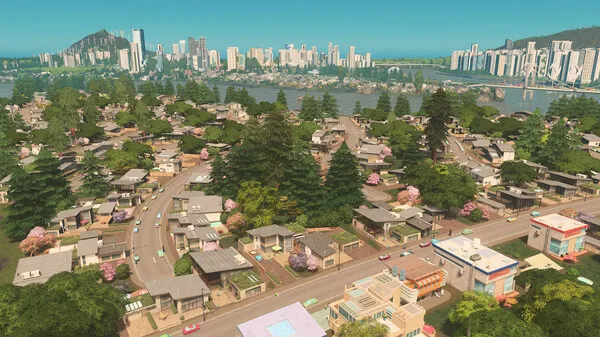
The Cities Skylines PC version takes full advantage of modern hardware, offering beautiful landscapes, detailed skyscrapers, and vibrant neighborhoods. Watching your city come alive with moving traffic, citizens walking the streets, and lights flickering at night creates an immersive experience that feels rewarding with every expansion.
Why Play Cities Skylines on PC?
The Cities Skylines PC version offers the most complete and customizable way to experience this city-building masterpiece. With the power of a keyboard and mouse, designing roads, zoning districts, and managing services becomes far more precise compared to console controls. Enhanced graphics on PC also mean you can enjoy smoother visuals, detailed cityscapes, and larger maps that make your urban creations truly come alive.
Another major advantage of playing Cities Skylines on computer is access to the thriving modding community. From custom buildings and unique landmarks to new transport options and gameplay tweaks, mods expand your creative freedom in ways no other platform can match. Plus, unlike mobile versions, PC gaming means no battery drain and the ability to multitask easily. Altogether, the PC version delivers the ultimate combination of performance, creativity, and convenience.

How to Download Cities Skylines on PC
Here is a step by step guide to download Cities Skylines on PC;
- Find the button: Scroll to the “Download Cities Skylines for PC” button on this page.
- Start the safe download: Click the button to begin the safe download from this page. When prompted, choose Save (not Open) and pick a familiar folder (e.g., Downloads).
- Locate the file: When the download finishes, open your Downloads folder and find the .zip (or .rar) archive.
- Extract the game: Right-click the archive → Extract All… (or use 7-Zip/WinRAR) → choose a destination folder.
- Open the folder: Go to the extracted folder and look for Cities Skylines.exe.
- Launch the game: Double-click the .exe to start. If Windows SmartScreen appears, select More info → Run anyway (only if you downloaded from the button on this page).
- Set up controls & video: In the Options/Settings menu, choose your resolution/fullscreen, adjust audio latency, and confirm keyboard bindings (← → ↑ ↓).
- Create a shortcut (optional): Right-click Cities Skylines.exe → Send to → Desktop (create shortcut) for quick access.
- Play & enjoy: Start Story Mode or Free Play, and you’re good to go!
How to Play Cities Skylines on PC
Getting started with Cities Skylines PC is both exciting and straightforward. Once you launch the game, you’ll begin with a small plot of land and a limited budget. The first step is to lay down basic roads and connect them to the highway so citizens can move in. Next, zone areas for residential, commercial, and industrial use, ensuring you provide essential utilities like power, water, and sewage management. These basics will attract your first residents and kick-start the growth of your city.
As your population expands, the real challenge begins—balancing services, economy, and infrastructure. You’ll need to build schools, hospitals, fire stations, and police departments while also keeping traffic flowing smoothly. Use the in-game statistics and overlays to monitor citizen needs, pollution levels, and traffic congestion. Experiment with policies, public transport systems, and city expansions to optimize growth. For added creativity, explore mods and custom assets that make the Cities Skylines PC version even more enjoyable and tailored to your playstyle.

System Requirements
Minimum Requirements
- OS: Windows 7/8/10 (64-bit)
- Processor: Intel Core 2 Duo 3.0 GHz or AMD Athlon 64 X2 6400+
- RAM: 4 GB
- Graphics: NVIDIA GeForce GTX 260 / ATI Radeon HD 5670
- Storage: 4 GB available space
Recommended Requirements
- OS: Windows 10 (64-bit)
- Processor: Intel Core i5-3470 or AMD FX-6300
- RAM: 8 GB
- Graphics: NVIDIA GeForce GTX 660 / AMD Radeon HD 7870
- Storage: 4 GB available space
FAQs
Is Cities Skylines free to play on PC?
No, Cities Skylines PC is a paid game, but it frequently goes on discount during sales on platforms like Steam or Epic Games. Occasionally, promotional events may even offer it for free for a limited time.
Can I play Cities Skylines offline on my computer?
Yes. Once you’ve downloaded and installed the game, you can play Cities Skylines on PC without an internet connection. However, online access is required for downloading mods or updates.
Does the PC version of Cities Skylines support mods?
Absolutely. The Cities Skylines PC version is best known for its extensive modding community. You can download thousands of mods from the Steam Workshop to customize buildings, transport systems, and even add new gameplay mechanics.
How big is the download size of Cities Skylines on PC?
The base game requires around 4–6 GB of storage. However, keep in mind that installing DLCs and mods can significantly increase the overall size.
Can my low-end PC run Cities Skylines?
Yes, if your PC meets the minimum requirements, you can run the game. But for larger cities or smoother performance, the recommended specs are highly advised.
Are all DLCs and expansions available on the PC version?
Yes. Every official expansion and DLC released for Cities Skylines is fully supported on PC. From After Dark to Green Cities and beyond, you’ll have access to the complete package.
Does Cities Skylines have multiplayer on PC?
The game is officially single-player only. However, some community mods experiment with multiplayer features, allowing limited cooperative play for enthusiasts.
Alternatives to Cities Skylines on PC
If you enjoy Cities Skylines PC but want to try something different, there are several excellent city-building and management games worth exploring. Here are five alternatives that offer unique gameplay experiences:
1. SimCity (2013)
As the grandfather of city-building games, SimCity remains a classic. It features intuitive city management, region-based development, and engaging scenarios. While it’s older, many fans still revisit it for its nostalgic charm and accessible gameplay.
2. Tropico 6
Tropico takes a lighter, humorous approach to city-building. You play as “El Presidente,” managing a tropical island while balancing politics, economics, and citizen satisfaction. The game combines city simulation with witty political strategy, making it both fun and challenging.
3. Surviving Mars
For players who want a twist on urban planning, Surviving Mars shifts the focus from Earth to the Red Planet. You’ll build domes, manage resources, and keep colonists alive in a harsh environment. It’s a survival and city-building hybrid with a futuristic edge.
4. Banished
Banished focuses on survival-driven city management. Instead of building modern cities, you guide a group of exiled villagers, ensuring they survive through farming, trading, and resource management. The difficulty and focus on survival make it especially appealing to hardcore strategy fans.
5. Anno 1800
Set during the Industrial Revolution, Anno 1800 blends city-building with trade, diplomacy, and exploration. Players manage production chains, grow their cities, and expand influence across islands. Its mix of economic depth and historical setting makes it a favorite for strategy lovers.
Conclusion
Cities Skylines PC stands as the ultimate city-building game, blending creativity, strategy, and realism into one seamless experience. Whether you’re designing road networks, managing public services, or experimenting with mods, the game offers endless possibilities for aspiring mayors. With enhanced graphics, smooth controls, and expansive customization, the PC version remains the best way to enjoy this modern classic. If you’re ready to challenge your planning skills and create the city of your dreams, don’t wait any longer—click the Download button on this page and start building your metropolis today.