Stumble Guys PC
Play Stumble Guys on PC for smooth gameplay, fun obstacle races, and nonstop multiplayer action. Run, jump, and stumble your way to victory!
If you’re into fun, fast-paced, and chaotic multiplayer games, Stumble Guys is probably already on your radar. Developed by Kitka Games, this wildly entertaining battle royale party game has taken the mobile and PC gaming world by storm. With over 100 million downloads on Google Play and counting, it’s one of the most popular casual games that blend hilarious physics, obstacle courses, and competitive fun all in one package.
But here’s the deal—while Stumble Guys was originally made for mobile devices, many players are now switching to the Stumble Guys PC version to enjoy smoother graphics, improved controls, and a more immersive experience. Playing Stumble Guys on PC allows gamers to dive into the colorful chaos on a larger screen without worrying about lags, crashes, or drained batteries.
So, if you’re ready to tumble, jump, and laugh your way to victory, now’s the time to download Stumble Guys for PC. In this guide, we’ll show you everything from gameplay tips to installation steps—so you can start playing in minutes.
Gameplay Overview
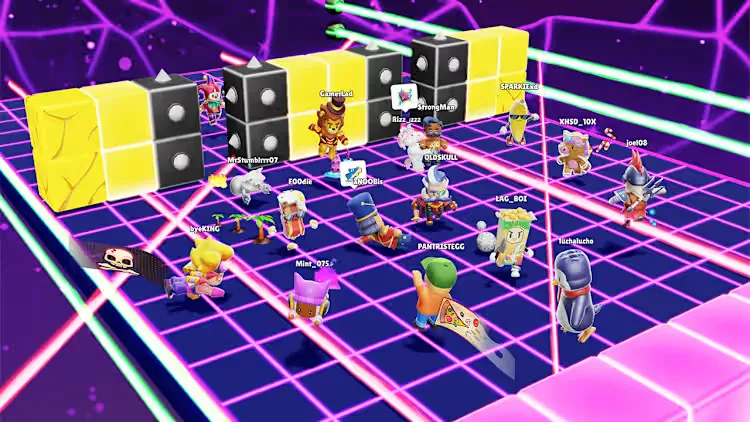
Stumble Guys PC is a multiplayer knockout game where up to 32 players compete in real-time to be the last one standing. Players run, jump, dash, and stumble their way through a series of wacky obstacle courses that get more chaotic as the rounds progress. Every level eliminates players until one final winner is crowned.
Each match is fast-paced, often lasting just a few minutes, making it perfect for casual gaming sessions or quick breaks. The game’s combination of colorful maps, unpredictable physics, and goofy character movements keeps players hooked—and playing Stumble Guys on computer only enhances the fun with better precision and visuals.

Key Features
1. Hilarious Multiplayer Battles
Jump into real-time battles with up to 32 players from around the world. The chaos of multiple players stumbling, bumping, and falling over each other is what makes Stumble Guys PC endlessly entertaining.
2. Vibrant and Dynamic Maps
From icy slides to spinning hammers, each map offers unique obstacles and challenges. The Stumble Guys PC version makes these environments pop with vibrant colors and crisp details.
3. Customizable Characters
Express yourself through quirky skins, emotes, and outfits. Whether you want to be a ninja, pirate, or banana, customization adds personality to every match.
4. Smooth Controls and Physics
The game’s physics engine makes every stumble feel natural (and hilarious). On PC, controls are even smoother with the precision of a keyboard or mouse.
5. Cross-Platform Play
Compete with friends regardless of their platform—mobile or PC. Cross-platform compatibility ensures the fun never stops.
6. Frequent Updates and New Content
The developers regularly introduce new maps, skins, and events, keeping the experience fresh and exciting.
7. Fun Party Mode
Invite your friends to private matches and create your own mini-tournaments. Party mode turns Stumble Guys on PC into a social, laughter-filled experience.
Why Play Stumble Guys on PC?
While Stumble Guys was designed for mobile devices, playing it on a PC takes the experience to a whole new level. The Stumble Guys PC version delivers smoother graphics, higher frame rates, and improved visual clarity, allowing players to fully enjoy the vibrant obstacle courses and hilarious chaos in stunning detail. You also get the benefit of keyboard and mouse controls, which provide far more precision than touch controls—especially useful when you’re sprinting, jumping, and dodging obstacles in fast-paced matches.
Beyond visuals and control, playing Stumble Guys on PC means no battery drain, overheating, or interruptions from calls and notifications. You can enjoy extended gaming sessions without worrying about your phone’s performance. Plus, with cross-platform syncing, your progress and customization stay consistent across devices, so you can pick up right where you left off. Whether you’re streaming, recording, or just looking for a smoother, more immersive gaming experience, Stumble Guys on computer is the best way to enjoy this action-packed party game.

How to Download Stumble Guys on PC
Here is a step by step guide to download Stumble Guys on PC;
- Find the button: Scroll to the “Download Stumble Guys for PC” button on this page.
- Start the safe download: Click the button to begin the safe download from this page. When prompted, choose Save (not Open) and pick a familiar folder (e.g., Downloads).
- Locate the file: When the download finishes, open your Downloads folder and find the .zip (or .rar) archive.
- Extract the game: Right-click the archive → Extract All… (or use 7-Zip/WinRAR) → choose a destination folder.
- Open the folder: Go to the extracted folder and look for Stumble Guys PC. exe.
- Launch the game: Double-click the .exe to start. If Windows SmartScreen appears, select More info → Run anyway (only if you downloaded from the button on this page).
- Set up controls & video: In the Options/Settings menu, choose your resolution/fullscreen, adjust audio latency, and confirm keyboard bindings (← → ↑ ↓).
- Create a shortcut (optional): Right-click Stumble Guys.exe → Send to → Desktop (create shortcut) for quick access.
- Play & enjoy: Start Story Mode or Free Play, and you’re good to go!
How to Play Stumble Guys on PC
Once installed, launch the game and either sign in with your existing account or start fresh. The controls are straightforward—use the WASD keys to move, Spacebar to jump, and Mouse or Arrow keys to adjust your camera angle. You can even map custom controls through platforms like BlueStacks for a more personalized experience.
As rounds progress, focus on mastering timing and movement to dodge obstacles and reach the finish line first. Practice makes perfect, and the Stumble Guys PC version gives you better precision to outplay your opponents.

System Requirements
Minimum Requirements
- OS: Windows 7/8/10 (64-bit)
- Processor: Intel or AMD Dual Core CPU
- RAM: 4 GB
- Graphics: Intel HD Graphics 4000
- Storage: 1 GB available space
Recommended Requirements
- OS: Windows 10/11 (64-bit)
- Processor: Intel i5 or higher
- RAM: 8 GB
- Graphics: NVIDIA GeForce GTX 660 or equivalent
- Storage: 2 GB available space
FAQs
Is Stumble Guys available for free on PC?
Yes, Stumble Guys is completely free to play on PC. You can easily download it through Steam or an Android emulator like BlueStacks without paying anything upfront. However, the game does include optional in-app purchases for skins, emotes, and special items to personalize your character.
Can I play Stumble Guys with my friends on PC and mobile?
Absolutely! One of the best things about the Stumble Guys PC version is its cross-platform compatibility. This means you can easily team up or compete against friends who play on mobile devices. Just make sure everyone is logged into their accounts before starting a match.
Do I need a powerful PC to run Stumble Guys?
No, Stumble Guys doesn’t require high-end hardware. It’s optimized to run smoothly even on older PCs. As long as you meet the minimum system requirements (4GB RAM, Intel or AMD Dual Core CPU, and basic integrated graphics), you’ll enjoy a stable gaming experience.
Can I use a controller to play Stumble Guys on PC?
Yes, controller support is available in the Stumble Guys PC version. You can connect any compatible USB or Bluetooth controller to your PC, then customize the control layout to match your playstyle. This makes gameplay even more comfortable and precise.
Is there a difference between the mobile and PC versions of Stumble Guys?
While the gameplay remains the same, the PC version offers several advantages: enhanced graphics, faster performance, customizable controls, and no battery limitations. Playing Stumble Guys on computer also allows for better multitasking, streaming, and overall smoother gaming sessions.
How often does Stumble Guys get new updates on PC?
Kitka Games, the developer behind Stumble Guys, releases frequent updates packed with new skins, maps, events, and bug fixes. Updates usually roll out simultaneously across platforms, ensuring PC players always enjoy the latest content and seasonal events at the same time as mobile users.
Alternatives to Stumble Guys on PC
If you love Stumble Guys, here are some similar fun-filled games to try:
1. Fall Guys: Ultimate Knockout
The original inspiration for Stumble Guys, Fall Guys offers massive obstacle courses and hilarious elimination rounds with vibrant 3D environments.
2. Human: Fall Flat
A physics-based puzzle platformer that challenges your coordination and creativity in hilarious ways.
3. Party Animals
Battle it out as adorable animals in chaotic arenas—packed with laughs and physics-driven combat.
4. Gang Beasts
An iconic multiplayer brawler where jelly-like characters fight, throw, and push each other off bizarre arenas.
5. Totally Reliable Delivery Service
Deliver packages with friends in a world where physics—and sanity—don’t always apply!
Conclusion
In short, Stumble Guys PC offers the ultimate way to enjoy this chaotic, laugh-out-loud multiplayer experience. With smoother graphics, improved controls, and seamless cross-platform play, the PC version lets you fully immerse yourself in the fun without any limits. Whether you’re a casual gamer or a competitive player aiming for that final crown, playing Stumble Guys on PC delivers a perfect mix of entertainment, precision, and performance. So, don’t wait—download Stumble Guys PC today and join millions of players stumbling, dashing, and laughing their way to victory!