Toca Life World PC
Play Toca Life World PC to create stories, customize characters, and explore colorful worlds with smooth controls and stunning graphics.
Toca Life World is a fun and imaginative simulation game that lets players create their own stories and explore a colorful digital universe. Developed by Toca Boca, it combines all the Toca Life apps like City, Hospital, and Vacation into one huge world full of creativity and adventure. On PC, the game provides a larger, more immersive experience, allowing players to freely build, decorate, and interact with hundreds of characters and locations.
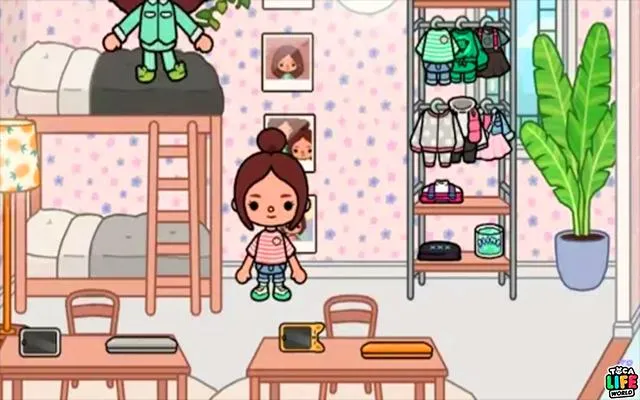
The main appeal of Toca Life World PC lies in its freedom of expression. Players can design their own characters, customize their homes, and invent unique stories without any rules or limitations. Everything in the game is interactive from cooking meals and shopping to visiting schools or taking care of pets. The PC version enhances this creative freedom with improved controls, smoother graphics, and better multitasking, making it ideal for both kids and adults who love storytelling and open-ended play.
With regular updates and new locations added frequently, Toca Life World continues to grow into a vibrant and ever-evolving digital playground. Whether you’re designing dream houses, exploring new worlds, or just having fun with friends, the game encourages imagination, exploration, and self-expression. Playing Toca Life World on PC ensures a bigger screen, more comfortable gameplay, and endless possibilities for creativity.
Gameplay Overview
The gameplay of Toca Life World PC centers around open-ended exploration and creativity. Players can move freely between different locations such as cities, homes, schools, and shops, interacting with hundreds of characters and objects. There are no missions, scores, or time limits everything is about imagination and storytelling. Players can drag and drop items, dress up characters, cook meals, decorate rooms, or even create funny or dramatic scenarios. Every corner of the game world reacts to touch, encouraging curiosity and experimentation.
On PC, the gameplay experience becomes even smoother and more detailed. The larger screen and precise mouse controls make it easier to design spaces and move characters around. Players can record their adventures, build custom scenes, and combine elements from different Toca Life locations to craft unique stories. The game constantly evolves with new updates, events, and items, ensuring that every play session feels fresh and full of possibilities. It’s a sandbox experience that rewards creativity and imagination above all else.

Key Features
Toca Life World PC is packed with exciting and educational features that encourage imagination, exploration, and creativity. Whether you’re new to the Toca Boca universe or a long-time fan, these features make the Toca Life World PC version a must-try for players of all ages.
1. Massive Open World
Toca Life World PC brings together multiple Toca Life locations such as City, Hospital, Vacation, and more into one expansive universe. Players can travel between different places effortlessly, exploring everything from bustling downtowns to cozy homes and beaches. Each area is filled with interactive objects, hidden secrets, and colorful characters that make exploration endlessly fun.
2. Endless Customization
One of the game’s strongest features is its deep customization system. Players can design their own characters by choosing hairstyles, clothes, and accessories, then decorate apartments or entire buildings to suit their personal taste. With hundreds of design options and constant new updates, creativity knows no limits.
3. Storytelling Freedom
Unlike traditional games with missions or objectives, Toca Life World focuses on free play and imagination. Players create their own stories, decide how characters interact, and invent new adventures. This storytelling freedom encourages creativity, role-playing, and even collaborative fun with friends or family.
4. Hundreds of Characters and Locations
The game features a vast collection of over 500 characters and more than 100 locations (some free, others available through expansion). Each character has unique animations and items they can interact with. This variety keeps gameplay engaging, as players can always find new people, places, and things to discover.

5. Regular Updates and New Content
Toca Boca continually updates Toca Life World with fresh locations, furniture packs, and characters. These updates ensure that the game world keeps growing, offering players new experiences over time. Seasonal events and limited-time items also add excitement and variety throughout the year.
6. Educational and Safe Environment
Designed with young players in mind, the game promotes learning through play. It encourages problem-solving, social interaction, and creative thinking in a safe, non-competitive environment. There are no ads, timers, or in-game pressures, making it a relaxing space for kids to explore freely.
7. Enhanced PC Experience
Playing Toca Life World on PC provides smoother performance, high-resolution visuals, and precise control via mouse and keyboard. Players can enjoy a larger display that brings every detail to life, making it easier to build, decorate, and create stories. It’s an ideal version for players who want a richer and more immersive experience.
Why Play Toca Life World on PC?
Playing Toca Life World on PC offers an entirely new level of immersion and comfort for players who love creativity and storytelling. The larger screen of a computer enhances every detail from the bright colors and adorable animations to the intricate world design that makes this game so charming. It allows players to see more of their world at once, making it easier to manage characters, decorate rooms, and explore multiple locations seamlessly. The crisp graphics and smooth frame rates available on PC provide a much more engaging and enjoyable experience than a smaller mobile screen can offer.
Beyond visuals, the Toca Life World PC version delivers better control and efficiency. Players can use a keyboard and mouse to move characters or drag objects more precisely, making creative storytelling smoother and faster. Another advantage is the ability to play for extended periods without worrying about battery drain, interruptions, or overheating common issues on mobile devices. The PC setup also allows multitasking, so users can record gameplay, chat, or create videos while building their stories. Overall, playing Toca Life World on PC transforms a simple mobile experience into a full-fledged creative adventure, giving players the space and power to bring their imagination to life.
How to Download Toca Life World on PC
Here is a step by step guide to download Toca Life World on PC;
- Find the button: Scroll to the “Download Toca Life World for PC” button on this page.
- Start the safe download: Click the button to begin the safe download from this page. When prompted, choose Save (not Open) and pick a familiar folder (e.g., Downloads).
- Locate the file: When the download finishes, open your Downloads folder and find the .zip (or .rar) archive.
- Extract the game: Right-click the archive → Extract All… (or use 7-Zip/WinRAR) → choose a destination folder (e.g., C:\Games\FNF).
- Open the folder: Go to the extracted folder and look for Toca Life World.exe (sometimes named FNF.exe).
- Launch the game: Double-click the .exe to start. If Windows SmartScreen appears, select More info → Run anyway (only if you downloaded from the button on this page).
- Set up controls & video: In the Options/Settings menu, choose your resolution/fullscreen, adjust audio latency, and confirm keyboard bindings (← → ↑ ↓).
- Create a shortcut (optional): Right-click Toca Life World.exe → Send to → Desktop (create shortcut) for quick access.
- Play & enjoy: Start Story Mode or Free Play, and you’re good to go!
How to Play Toca Life World on PC
Once you’ve installed Toca Life World on PC, the fun truly begins. When you open the game, you’ll find yourself in a bright, interactive world filled with endless possibilities. Start by exploring the main city, where you can visit shops, apartments, schools, and salons. Each location is packed with characters, items, and hidden surprises waiting to be discovered. The game’s intuitive drag-and-drop mechanics make it easy to move characters, interact with objects, and create your own stories. On a computer, these actions become even smoother thanks to the precision of a mouse and the quick response of keyboard shortcuts.
The Toca Life World PC version allows you to unleash your imagination without any limits. You can design characters, decorate homes, or connect scenes from different locations to form your own universe. Want to create a family, run a café, or film a mini show? Everything is possible with just a few clicks. Playing on a PC also means you can record gameplay, stream your adventures, or take screenshots of your creations effortlessly. Whether you’re a kid learning through play or an adult who loves casual creativity, playing Toca Life World on a computer transforms every session into an exciting, story-driven experience full of color, imagination, and fun.

System Requirements
Minimum Requirements:
- OS: Windows 7 or higher
- Processor: Intel or AMD CPU
- RAM: 4 GB
- Storage: 5 GB free space
- Emulator: BlueStacks, LDPlayer, or NoxPlayer
Recommended Requirements:
- OS: Windows 10/11 (64-bit)
- Processor: Intel i5 or higher
- RAM: 8 GB or more
- GPU: Dedicated graphics (NVIDIA/AMD)
- Storage: SSD for faster loading
FAQs
Is Toca Life World free to play on PC?
Yes, Toca Life World PC is completely free to play when you download it through a trusted Android emulator such as BlueStacks or LDPlayer. While the core game is free, some premium locations and items may require optional in-app purchases. However, you can enjoy most of the creative gameplay without spending a dime.
Can I play Toca Life World on PC without an emulator?
Currently, Toca Life World is designed for mobile devices, so an emulator is needed to run the game on PC. Emulators like BlueStacks or NoxPlayer let you easily install and play the game on a larger screen with better performance and smoother controls.
Is Toca Life World PC safe for children?
Absolutely! Developed by Toca Boca, a studio known for its child-friendly titles, the game is designed with safety in mind. There are no ads, online chats, or inappropriate content. Parents can let kids play confidently, knowing the Toca Life World PC version encourages creativity and learning in a secure environment.
Can I transfer my progress from mobile to PC?
Yes, progress can be synced between your mobile and PC versions. Simply log in using the same account on both devices, and your saved worlds, characters, and purchases will automatically transfer.
Do I need a powerful computer to play Toca Life World on PC?
No, you don’t need a gaming PC. The game runs smoothly on most modern computers. As long as you meet the minimum requirements 4 GB RAM, Windows 7 or higher, and a stable internet connection you can enjoy a seamless experience.
Are updates and new content available on the PC version?
Yes! The Toca Life World PC version receives the same updates as the mobile version. Whenever new locations, characters, or features are added, you’ll get them automatically through the emulator’s Play Store connection.
Can I record or stream my gameplay on PC?
Yes, that’s one of the biggest advantages of playing Toca Life World on computer. Emulators like BlueStacks come with built-in recording and streaming tools. You can easily capture your gameplay, share your stories online, or create fun educational videos for YouTube.
Alternatives to Toca Life World on PC
If you enjoy creative simulation games, here are five great alternatives:
- My Town Series – A series of role-playing games focused on family life, school, and city adventures.
- Roblox – Create, play, and share mini-games with millions of players around the world.
- The Sims 4 – A realistic life simulation game where you control characters, build homes, and live your story.
- PK XD – A colorful virtual world where you can customize your avatar, play mini-games, and socialize.
- Play Together – Combines social simulation and mini-games for a multiplayer experience similar to Toca Life World.
Conclusion
Toca Life World PC transforms creative storytelling into a bigger, brighter, and smoother adventure. With enhanced graphics, intuitive controls, and limitless possibilities, the PC version offers players a chance to explore, build, and imagine without boundaries. Whether you’re crafting stories, decorating homes, or creating your dream world, this game brings endless fun and learning for all ages. Don’t miss the opportunity to experience the magic of Toca Boca’s world on your computer click the Download button now and start building your very own stories today!