Raft PC
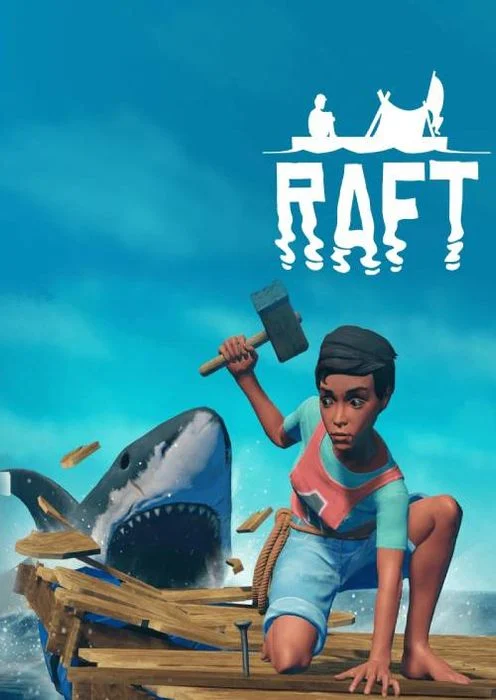
Raft PC challenges you to survive at sea by crafting, building, and exploring. Battle sharks, gather resources, and create your ultimate floating fortress.
Survival games have taken the gaming world by storm, and Raft PC stands out as one of the most thrilling adventures you can play today. Developed by Redbeet Interactive and published by Axolot Games, Raft plunges players into an endless ocean where the only goal is to survive. Starting with nothing more than a hook and a tiny raft, players must gather resources, craft tools, and expand their floating base while battling hunger, thirst, and deadly shark attacks.
The game has gained immense popularity on Steam, with millions of players diving into its multiplayer co-op survival experience. Its unique ocean-based setting, dynamic weather, and creative building system set it apart from traditional survival games. Fans often highlight the exciting mix of exploration and strategy, which keeps the gameplay engaging for both solo adventurers and groups of friends.
Playing Raft on PC offers the best experience, thanks to enhanced graphics, smoother gameplay, and precise controls. Unlike mobile devices or consoles, a computer allows you to enjoy longer sessions without worrying about battery drain or performance issues. If you’re looking for a survival game that blends creativity, danger, and teamwork, you should definitely download Raft for PC and embark on this unforgettable ocean journey.
Gameplay Overview
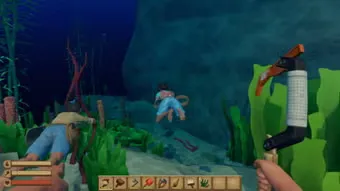
Raft PC delivers a survival experience unlike any other by placing players in the middle of an endless ocean with only a small raft to start. Using a trusty hook, you’ll gather floating debris like wood, plastic, and leaves—resources that are the backbone of your survival. From these materials, you can craft tools, expand your raft, and build essential stations for cooking food and purifying water.
As the adventure unfolds, players explore mysterious islands, uncover hidden secrets, and defend their raft against the relentless shark that circles below. Whether you choose to play solo or team up in multiplayer co-op, every decision matters. The balance between exploration, crafting, and survival makes Raft on PC both challenging and endlessly rewarding.
Key Features
1. Unique Ocean Survival Setting
Unlike typical survival games set on land, Raft PC drops you into the middle of an endless ocean. With no safe ground under your feet, survival depends on your ability to use drifting debris and your own creativity. This ocean environment creates constant tension, as resources are limited and threats can appear at any time.
2. Extensive Crafting and Building System
Raft is not just about staying alive—it’s also about creating. From simple tools to complex cooking stations, water purifiers, and storage solutions, the crafting system is at the heart of the game. Players can expand their tiny raft into a multi-story floating fortress complete with defenses, farms, and even decorative touches that make survival more enjoyable.
3. Exploration of Islands and Secrets
The ocean may feel endless, but scattered throughout the world are mysterious islands, abandoned rafts, and hidden treasures waiting to be discovered. These areas often hold rare resources, blueprints, or clues to the game’s storyline. Exploration is always rewarding, pushing you to venture beyond your raft’s safety.
4. Thrilling Multiplayer Co-op Mode
Survival is tough, but it’s even more exciting when shared. Raft offers a multiplayer co-op option, allowing you and your friends to join forces. Working together means dividing tasks like fishing, crafting, and defending against sharks, making teamwork the ultimate key to thriving in the ocean.
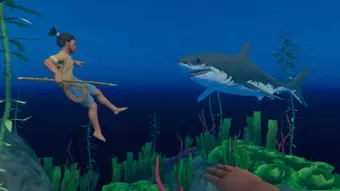
5. Constant Threats and Wildlife Encounters
Danger lurks in the water. The menacing shark that circles your raft will strike without warning, keeping you on edge. Players can craft weapons to fend it off or hunt fish for food. Beyond sharks, the world includes other wildlife encounters that add both risks and rewards to your adventure.
6. Engaging Storyline and Lore
Raft goes beyond simple survival by weaving in a narrative-driven experience. Through notes, radio signals, and exploration, players uncover the mystery of what happened to the world. The story adds depth and purpose, turning your raft from just a survival project into a vessel for discovery.
7. Regular Updates and Community Mods
One of the biggest strengths of Raft PC is its ongoing developer support. New story chapters, islands, items, and gameplay mechanics are regularly added, keeping the experience fresh. On top of that, PC players benefit from community-made mods, which allow for even more creativity and customization in gameplay
Why Play Raft on PC?
Playing Raft on PC offers the most immersive way to enjoy this survival adventure. The enhanced graphics let you truly appreciate the vast ocean views, detailed raft designs, and breathtaking sunsets, while smoother performance ensures the game runs seamlessly even during intense shark attacks or large base builds.
Another major advantage is the keyboard and mouse controls, which give you precision when crafting, aiming, and managing resources. Unlike mobile or console versions, PC gaming means no battery drain, faster loading times, and the ability to multitask between sessions. Plus, PC players gain access to community mods and updates more quickly, making the Raft PC version the best choice for gamers who want the ultimate survival experience.
How to Download Raft on PC
Here is a step by step guide to download Raft on PC;
- Find the button: Scroll to the “Download Raft for PC” button on this page.
- Start the safe download: Click the button to begin the safe download from this page. When prompted, choose Save (not Open) and pick a familiar folder (e.g., Downloads).
- Locate the file: When the download finishes, open your Downloads folder and find the .zip (or .rar) archive.
- Extract the game: Right-click the archive → Extract All… (or use 7-Zip/WinRAR) → choose a destination folder.
- Open the folder: Go to the extracted folder and look for Raft PC.exe.
- Launch the game: Double-click the .exe to start. If Windows SmartScreen appears, select More info → Run anyway (only if you downloaded from the button on this page).
- Set up controls & video: In the Options/Settings menu, choose your resolution/fullscreen, adjust audio latency, and confirm keyboard bindings (← → ↑ ↓).
- Create a shortcut (optional): Right-click Raft PCexe → Send to → Desktop (create shortcut) for quick access.
- Play & enjoy: Start Story Mode or Free Play, and you’re good to go!
How to Play Raft on PC
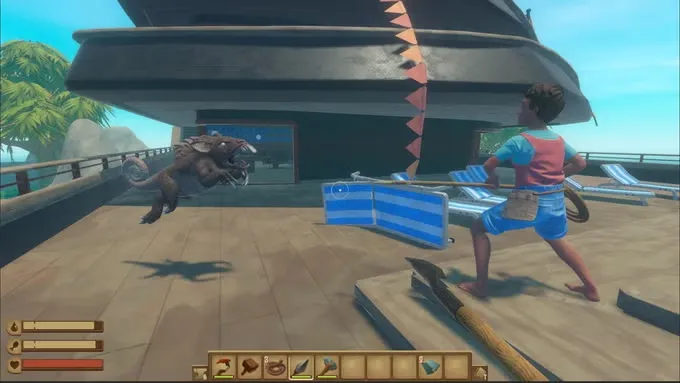
Starting your journey in Raft PC may feel overwhelming, but the gameplay is designed to gradually guide you into survival. You begin stranded on a tiny wooden raft with only a hook in hand. Use this hook to pull floating debris such as planks, plastic, and leaves from the ocean—these basic materials are essential for crafting tools, food, and water purifiers. Prioritize survival essentials first: build a purifier to secure drinking water, a grill to cook food, and storage boxes to organize your resources.
As your raft expands, you’ll face new challenges and opportunities. Defend your floating base from shark attacks using crafted weapons, and prepare for exploration. Islands scattered across the ocean hold rare resources, wild animals, and valuable blueprints. Multiplayer co-op mode makes this experience even richer, as friends can split tasks like building, fishing, and exploring. Whether playing solo or in a team, long-term survival on Raft PC depends on smart resource management, strategic upgrades, and bold exploration beyond your raft.
System Requirements
Minimum Requirements:
- OS: Windows 7 or later
- Processor: 2.6 GHz Dual Core or equivalent
- Memory: 4 GB RAM
- Graphics: GeForce GTX 500 / AMD Radeon HD 6000
- Storage: 6 GB available space
Recommended Requirements:
- OS: Windows 10 (64-bit)
- Processor: Intel i5 / AMD Ryzen 5 or higher
- Memory: 8 GB RAM
- Graphics: GTX 1050 Ti / AMD RX 570 or better
- Storage: 10 GB available space
FAQs
Is Raft PC free to play?
No, Raft is not a free-to-play game. It is available for purchase on Steam and occasionally goes on sale during seasonal events. Buying the game once gives you full access to updates and new story chapters without additional costs.
Can I play Raft on PC offline?
Yes. Raft offers a single-player offline mode, so you can enjoy survival on the ocean without an internet connection. However, if you want to play with friends in multiplayer co-op, you’ll need to stay online.
Does Raft PC support mods?
Absolutely! The Raft PC version supports community-made mods that enhance or customize gameplay. Mods can add new items, expand crafting, or change survival mechanics, making the game even more versatile.
Can I play Raft on computer with friends?
Yes. Raft includes online multiplayer co-op, allowing you to team up with friends. Together, you can divide survival tasks, expand the raft faster, and explore dangerous islands with greater efficiency.
Is Raft PC available for Mac or Linux?
Currently, Raft officially supports only Windows PCs. Mac and Linux players would need to use workarounds such as Boot Camp, Wine, or third-party emulators to run the game.
How large is the Raft PC download size?
The base game requires around 6–10 GB of storage, depending on the version and installed updates. It’s relatively lightweight compared to other modern survival games.
Does Raft PC have controller support?
Yes, Raft supports both keyboard and mouse as well as controllers. However, many players prefer keyboard/mouse for precision when building and aiming, especially in intense survival scenarios.
Alternatives to Raft on PC
If you’ve enjoyed the survival challenges of Raft PC but want to explore similar adventures, here are some excellent alternatives worth trying:
1. Subnautica
Dive into an alien ocean world filled with mysterious creatures, underwater caves, and survival challenges. Subnautica emphasizes exploration, resource gathering, and base-building while uncovering a rich sci-fi storyline.
2. The Forest
A chilling mix of survival and horror, The Forest drops you in a mysterious wilderness after a plane crash. You’ll craft shelters, hunt for food, and defend yourself against cannibalistic tribes lurking in the shadows.
3. Stranded Deep
Offering a more realistic survival experience, Stranded Deep takes place in the Pacific Ocean. Players must scavenge islands, dive for resources, and craft tools while facing natural dangers like storms and sharks.
4. Green Hell
Set in the Amazon rainforest, Green Hell challenges you with realistic survival mechanics, including managing health, nutrition, and even mental stability. It’s one of the toughest survival sims for players who want a true test.
5. Don’t Starve Together
A unique survival game with a dark, hand-drawn art style, Don’t Starve Together is perfect for players who enjoy co-op challenges. You’ll need to craft, explore, and fight to survive in a quirky but dangerous world.
Conclusion
Raft PC is more than just a survival game—it’s an unforgettable ocean adventure that blends creativity, teamwork, and exploration. From battling sharks to building massive floating bases, every moment keeps you engaged and challenged. Playing on PC enhances the experience with smoother performance, precise controls, and access to mods that expand gameplay even further. Whether you’re playing solo or with friends, Raft delivers hours of fun and discovery. Don’t wait—click the Download button on this page to start your journey today and test your survival skills in the endless blue ocean.