
Apex Legends PC
Experience Apex Legends PC the ultimate hero-shooter battle royale with high-end graphics, smooth gameplay, and team-based strategy.
Few games have redefined the battle royale genre as dramatically as Apex Legends PC. Developed by Respawn Entertainment and published by Electronic Arts (EA), this free-to-play hero shooter burst onto the scene in 2019, blending lightning-fast gunplay with deep tactical gameplay and distinct character personalities. Within just one week of launch, the game amassed over 25 million players, proving its dominance in the competitive multiplayer arena. What makes Apex Legends stand out among titles like Fortnite and Call of Duty: Warzone is its combination of team-based strategy, futuristic combat mechanics, and a rich lore set in the Titanfall universe. Every match offers a new story, every Legend a new skillset, and every victory a rush of adrenaline that keeps players coming back for more.
For many gamers, the Apex Legends PC version offers the best way to experience this thrilling universe. Playing on PC unlocks the full potential of the game ultra-smooth frame rates, customizable graphics, and precise controls with a keyboard and mouse. Whether you’re sliding down the cliffs of Kings Canyon, zip-lining across Olympus, or sniping from the rooftops of Storm Point, the PC setup immerses you in every explosion, footstep, and callout with razor-sharp precision. On top of that, PC players enjoy cross-platform progression, allowing them to sync progress and cosmetics across devices using their EA account. This means no lost ranks, no missing skins just continuous progress, wherever you play.
It’s no surprise that millions of players worldwide prefer to download Apex Legends for PC rather than mobile or console. The PC experience delivers unmatched visuals, enhanced performance, and deeper customization from tweaking field-of-view settings to adjusting mouse sensitivity for competitive play. Beyond performance, PC gaming also provides the freedom to multitask: stream your gameplay, chat with teammates, or manage Discord overlays without interruption. Whether you’re a new recruit exploring your first drop or a seasoned competitor chasing Apex Predator rank, playing Apex Legends on PC ensures you experience every detail of this fast-paced, cinematic shooter the way it was meant to be played. So, gear up, assemble your squad, and click the Download button on this page to join the Apex Games where only the strongest survive.
Gameplay Overview
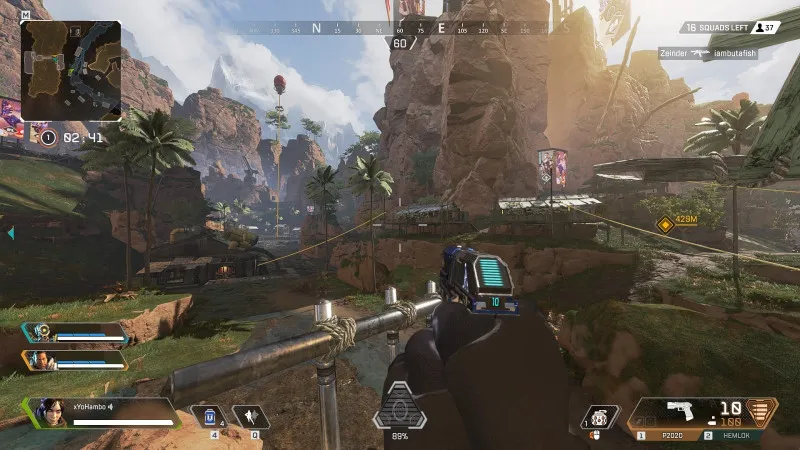
Apex Legends PC is a high-octane battle royale-hero shooter where strategy, teamwork, and precision define every match. Sixty players drop into vast, visually stunning arenas such as Kings Canyon, World’s Edge, and Storm Point, competing in squads of three to become the last team standing. Each squad member chooses a Legend, a hero with unique abilities, passive perks, and ultimate powers that can change the course of battle. Whether you’re using Bloodhound’s tracking vision, Wraith’s dimensional rift, or Gibraltar’s defensive dome, every Legend brings a distinct playstyle that adds depth and variety to the game. This combination of character-driven skills and fast-paced gunfights creates an experience that’s as tactical as it is thrilling. The movement mechanics sliding, wall-climbing, and zip-lining make Apex Legends on PC feel fluid, responsive, and incredibly satisfying for players who crave mobility and freedom in combat.
Unlike traditional shooters, Apex Legends PC version emphasizes team synergy and smart decision-making over brute force. The game’s innovative ping system allows seamless communication between teammates without needing voice chat, letting players mark enemies, loot, or strategic positions with ease. As the match progresses, a shrinking ring forces squads closer together, heightening tension and ensuring every encounter is packed with adrenaline. Along the way, players can loot weapons, armor, attachments, and healing items from supply bins and fallen enemies, constantly adapting to changing situations. With its balanced mix of tactical gameplay, hero-based combat, and stunning visuals, Apex Legends PC delivers a dynamic multiplayer experience that rewards skill, teamwork, and creativity making every match feel like a cinematic story of survival.
Key Features
1. Unique Legends with Powerful Abilities
One of the standout elements of Apex Legends PC is its roster of Legends distinctive heroes with their own abilities, strengths, and personalities. Each Legend plays a vital role in team composition. For instance, Lifeline can heal allies with her drone, Pathfinder provides unmatched mobility with his grappling hook, and Bangalore creates smokescreens for tactical retreats. Mastering your chosen Legend’s abilities and pairing them with complementary teammates adds incredible depth to every match.
2. Tactical Team-Based Gameplay
Unlike solo battle royales, Apex Legends on PC thrives on squad-based strategy. You drop in as a three-player team, where coordination and communication determine victory. Respawn’s innovative ping system allows seamless communication — mark enemies, call out loot, or suggest movement routes all without using a microphone. Every decision, from where to land to when to push or retreat, can change the tide of the match.
3. Fluid and Fast Movement Mechanics
Movement in Apex Legends PC version is unlike any other shooter. Players can slide down hills, zip-line across gaps, and climb obstacles, creating exhilarating mobility during combat. This parkour-inspired movement system rewards skillful play, allowing advanced techniques like slide-jumping and wall-hopping for those who love fluid, high-speed gameplay. Combined with precise PC controls, it offers a sense of freedom that console players envy.
4. Vast and Evolving Battle Royale Maps
Each map in Apex Legends PC from Kings Canyon to Olympus offers unique environments filled with urban zones, jungles, and high-tech structures. These maps rotate every season, introducing new areas and gameplay dynamics. Environmental storytelling and interactive features, like ziplines, loot vaults, and care packages, keep the experience fresh and unpredictable.
5. Deep Weapon Customization and Loot System
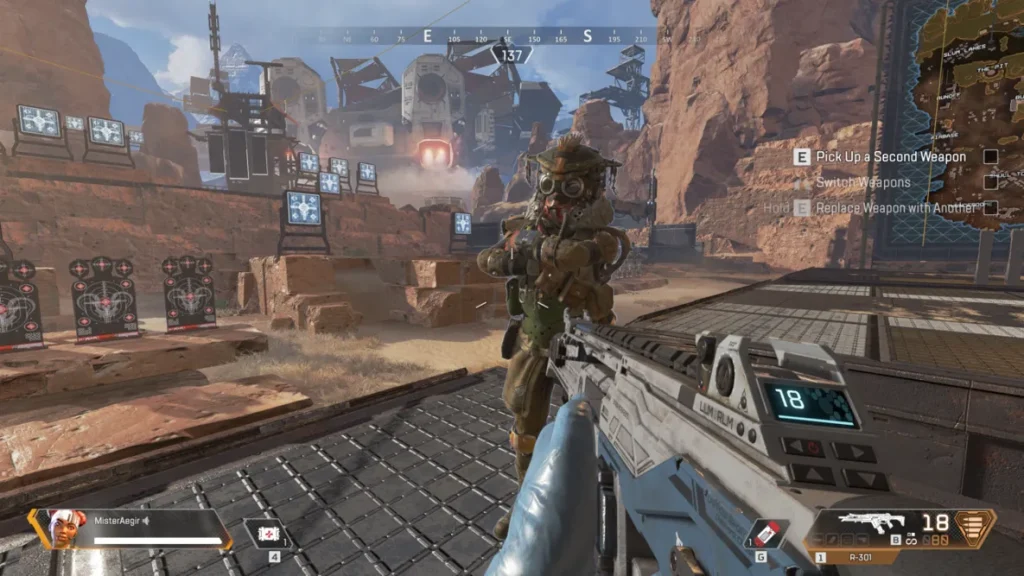
Looting is at the heart of Apex Legends PC. Players scavenge for weapons, attachments, and gear of varying rarity from common to legendary. The modular weapon system allows players to customize guns mid-battle with optics, barrels, and extended magazines. Whether you prefer the R-301 assault rifle, Peacekeeper shotgun, or Charge Rifle sniper, you’ll find a weapon that fits your style.
6. Seasonal Updates and Live Events
Respawn Entertainment consistently keeps Apex Legends PC version alive with seasonal updates, limited-time events, and battle passes. Each new season introduces a fresh Legend, weapon, or major map change, ensuring long-term excitement for returning players. The live events often come with exclusive cosmetics and challenges, giving gamers reasons to keep grinding and exploring new content.
7. Competitive and Cross-Platform Play
For players seeking a challenge, Apex Legends PC includes ranked leagues, where gamers climb from Bronze to Apex Predator. The matchmaking system ensures balanced, competitive games that test skill and teamwork. Moreover, cross-platform support lets PC players team up or compete with friends on PlayStation, Xbox, and Switch, creating one unified Apex Games community.
Why Play Apex Legends on PC?
Playing Apex Legends on PC takes the already thrilling battle royale experience to an entirely new level. The PC version delivers unmatched precision, fluidity, and control key elements that can make the difference between victory and defeat in the Apex Games. With a keyboard and mouse, players can aim with pinpoint accuracy and execute complex maneuvers that are often difficult on consoles. The higher frame rates, ultra-high resolutions, and adjustable graphics settings available on gaming PCs bring every explosion, movement, and particle effect to life. From the glistening sands of Storm Point to the neon skyline of Olympus, Apex Legends PC version lets you experience Respawn Entertainment’s masterpiece in its most visually stunning form. The game also supports high refresh rate monitors, ensuring ultra-smooth gameplay a crucial advantage for competitive players chasing that Apex Predator rank.
Beyond visuals and performance, playing Apex Legends on computer comes with added convenience and longevity. There’s no risk of overheating, battery drain, or connection drops that often plague mobile or console setups. You can easily stream your gameplay, record highlights, or multitask using chat and voice platforms like Discord without interrupting your match. The cross-platform progression system ensures your progress, achievements, and cosmetics carry across platforms via your EA account, allowing flexibility to switch between devices effortlessly. Additionally, the PC community enjoys early access to new patches and events, making it the go-to choice for both casual players and esports professionals. Simply put, if you want the best Apex Legends experience possible, complete with superior visuals, responsiveness, and customization, then playing on PC is the ultimate way to enjoy this battle royale phenomenon.

How to Download Apex Legends on PC
Here is a step by step guide to download Apex Legends on PC;
- Find the button: Scroll to the “Download Apex Legends for PC” button on this page.
- Start the safe download: Click the button to begin the safe download from this page. When prompted, choose Save (not Open) and pick a familiar folder (e.g., Downloads).
- Locate the file: When the download finishes, open your Downloads folder and find the .zip (or .rar) archive.
- Extract the game: Right-click the archive → Extract All… (or use 7-Zip/WinRAR) → choose a destination folder
- Open the folder: Go to the extracted folder and look for Friday Night Funkin’.exe
- Launch the game: Double-click the .exe to start. If Windows SmartScreen appears, select More info → Run anyway (only if you downloaded from the button on this page).
- Set up controls & video: In the Options/Settings menu, choose your resolution/fullscreen, adjust audio latency, and confirm keyboard bindings (← → ↑ ↓).
- Create a shortcut (optional): Right-click Friday Night Funkin’.exe → Send to → Desktop (create shortcut) for quick access.
- Play & enjoy: Start Story Mode or Free Play, and you’re good to go!
How to Play Apex Legends on PC
Once you’ve successfully downloaded and installed Apex Legends PC, it’s time to dive into the action. On your first launch, the game will guide you through a training session where you’ll learn basic controls like movement, aiming, shooting, and using your Legend’s abilities. Pay attention to these tutorials they teach crucial mechanics such as sliding, vaulting, and pinging, which are key to surviving in this fast-paced environment. After completing training, you can explore the Legends menu to choose your character. Each Legend has unique tactical and ultimate abilities, so experiment to find the one that matches your playstyle. For example, Lifeline is ideal for support players, Wraith for aggressive flanking, and Caustic for defensive strategists. Before jumping into matches, customize your settings, including mouse sensitivity, key binds, and field of view, to optimize your gameplay experience on PC.
In the main lobby, you can select between Battle Royale, Arenas, and limited-time modes. Once in a match, coordinate with your two teammates to choose a drop location strategically somewhere with good loot but manageable competition. As you play, collect weapons, ammo, shields, and healing items to prepare for encounters. The ping system is your best friend; use it to mark enemies, alert teammates to loot, or suggest directions without needing voice chat. Always stay inside the safe zone, as the enclosing ring can quickly eliminate careless players. To win, your team must outlast all others by combining smart positioning, teamwork, and sharp shooting. Whether you prefer aggressive pushes or calculated tactics, mastering Apex Legends on computer rewards both skill and strategy, making every match a heart-pounding adventure.

System Requirements
Minimum Specs
- OS: Windows 10 (64-bit)
- Processor: Intel Core i3-6300 / AMD FX-4350
- RAM: 6 GB
- GPU: NVIDIA GeForce GT 640 / Radeon HD 7730
- Storage: 70 GB free space
Recommended Specs
- OS: Windows 11 (64-bit)
- Processor: Intel i5-3570K / Ryzen 5 1600
- RAM: 16 GB
- GPU: NVIDIA GTX 970 / AMD RX 580
- Storage: SSD with 70 GB free space
- Internet: Stable broadband connection
FAQs
Is Apex Legends free to play on PC?
Yes, Apex Legends PC is completely free-to-play. You can download it safely from either the EA App or Steam without paying anything upfront. The core gameplay, all maps, and seasonal events are free. However, the game offers in-game purchases through Apex Coins, which players can use to buy new Legends, cosmetic skins, and Battle Passes. These purchases are entirely optional and do not affect core gameplay or give competitive advantages, maintaining a fair playing field for everyone.
How can I download Apex Legends for PC?
Downloading Apex Legends on PC is easy. Simply visit the official EA App or Steam Store, search for “Apex Legends,” and click Download. Once installed, sign in or create an EA account to link your progress and access cross-platform features. You can also click the Download button on this page to be redirected to the official, secure download source. The installation size is approximately 70 GB, so make sure you have enough disk space before starting.
What are the system requirements for Apex Legends PC version?
Apex Legends PC version runs smoothly even on mid-range computers.
Minimum Requirements:
OS: Windows 10 64-bit
CPU: Intel Core i3-6300 / AMD FX-4350
GPU: NVIDIA GT 640 / AMD HD 7730
RAM: 6 GB
Storage: 70 GB
Recommended Requirements:
OS: Windows 11 64-bit
CPU: Intel i5-3570K / Ryzen 5 1600
GPU: NVIDIA GTX 970 / AMD RX 580
RAM: 16 GB
Storage: SSD with 70 GB free space
For best performance, ensure your graphics drivers and DirectX are updated.
Does Apex Legends support cross-play and cross-progression on PC?
Yes! One of the biggest advantages of playing Apex Legends on PC is cross-play and cross-progression. Cross-play allows PC players to team up or compete with console players on PlayStation, Xbox, and Nintendo Switch. With cross-progression, all your cosmetics, ranks, and achievements are synced through your EA account, letting you switch platforms without losing progress.
Can I play Apex Legends PC version using a controller?
Absolutely. Apex Legends PC fully supports controllers, including Xbox and PlayStation gamepads. You can plug in your controller, and the game will automatically detect it. Some players even prefer using controllers for smoother movement or aim assist. You can also toggle between controller and mouse/keyboard seamlessly without restarting the game.
How do I improve performance while playing Apex Legends on computer?
If you’re facing frame drops or lag, start by lowering your graphics settings. Set your display mode to fullscreen, lower texture quality, and disable anti-aliasing for smoother performance. Also, ensure your PC meets at least the recommended specs and update your GPU drivers regularly. Using an SSD can significantly reduce loading times. Many players also optimize in-game sensitivity and FOV settings to improve responsiveness and reaction time during matches.
Is Apex Legends safe to download and play on PC?
Yes, it’s completely safe provided you download it from official sources like EA App, Steam, or the Download button on this page, which redirects you securely. Avoid unofficial or third-party sites that may host pirated versions, as these can contain malware or cause account bans. The official PC version includes anti-cheat protection, ensuring fair gameplay and account safety for all users.
Alternatives to Apex Legends on PC
1. Call of Duty: Warzone
A large-scale battle royale featuring modern combat, vehicles, and dynamic loadouts ideal for FPS fans.
2. Fortnite
Combines shooting with creative building mechanics, appealing to gamers who enjoy fast-paced and colorful action.
3. PUBG: Battlegrounds
The pioneer of realistic battle royale experiences, offering strategic gunfights and large open maps.
4. Valorant
A tactical shooter blending gunplay with character abilities perfect for players who enjoy precision and teamwork.
5. Overwatch 2
A vibrant hero shooter from Blizzard that emphasizes team coordination and unique character roles.
Conclusion
Apex Legends PC stands as one of the most exhilarating and polished battle royale experiences available today. With its fast-paced gameplay, diverse Legends, and ever-evolving maps, it offers something for every kind of gamer whether you’re into strategy, shooting precision, or pure adrenaline-fueled action. Playing on PC unlocks the game’s true potential, with stunning graphics, customizable controls, and seamless performance that make every battle more immersive. You’ll experience smoother gameplay, enhanced visuals, and cross-platform progress syncing that keeps your journey intact across devices. Don’t just watch the action become part of it. Click the Download button on this page to safely install Apex Legends PC version and join millions of players around the world competing for glory in the Apex Games. Your squad is waiting are you ready to become the next Champion.