Slime Rancher PC
Explore a colorful farm life adventure, collect cute slimes, manage your ranch, and relax in one of the most loved indie simulation games on PC.
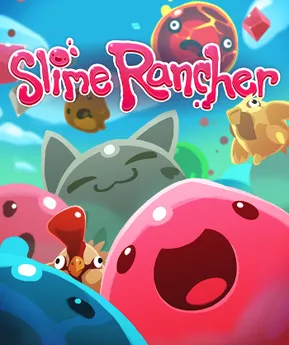
Slime Rancher is one of those rare indie games that quietly grew into a global favorite through sheer charm, creativity, and soothing gameplay. Developed by Monomi Park, this vibrant farm-life simulation blends open-world exploration, light resource management, and adorable creature collecting into an experience that feels both relaxing and deeply rewarding. Set on the colorful Far, Far Range, players are free to experiment, discover new areas, and build their ranch at their own pace without pressure or punishment. Since its full release in 2017, the game has sold millions of copies worldwide and fostered a passionate community that celebrates its stress-free design, playful art style, and endlessly satisfying progression, making it a standout title in the indie gaming scene.
At its core, the game puts you in the boots of Beatrix LeBeau, a rancher who travels to a distant planet known as the Far, Far Range. Your goal is simple but addictive: collect adorable slimes, care for them, harvest valuable plorts, and expand your ranch. What makes this title stand out is how approachable it feels. There’s no strict time pressure, no combat-heavy mechanics, and no overwhelming systems. Instead, players are encouraged to explore at their own pace, experiment freely, and enjoy the journey. This accessibility is a big reason why so many players prefer experiencing it on a computer rather than on smaller screens.
Playing on PC enhances everything the game offers. A larger display brings the vibrant environments to life, keyboard and mouse controls make slime management smoother, and multitasking lets players enjoy guides, mods, or streams alongside gameplay. Whether you’re new to farming simulators or a longtime fan of cozy PC games, this version delivers a polished and immersive experience. If you’re looking for a relaxing yet rewarding adventure, scroll down and use the download button available on this page to safely get started today.
Gameplay Overview
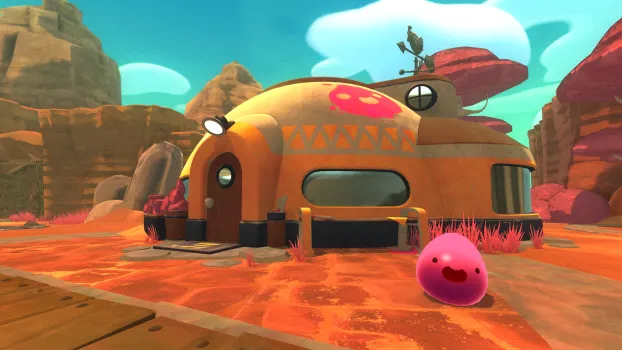
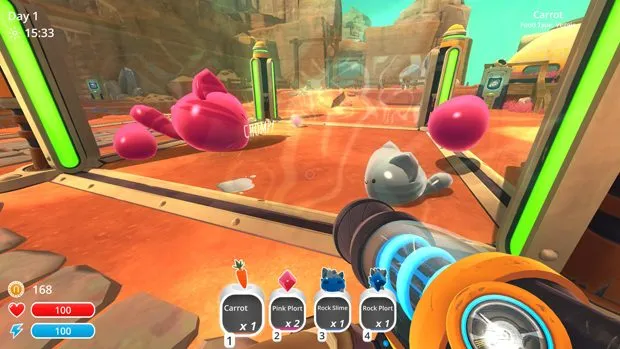
The gameplay revolves around exploration, collection, and ranch management, all presented from a first-person perspective. Players roam open zones filled with different slime species, each with unique behaviors, diets, and plort types. Using a versatile vacuum tool, you collect slimes, food, and resources, then transport them back to your ranch. The loop is simple but deeply engaging, encouraging experimentation and discovery rather than strict optimization.
As you progress, new areas unlock, advanced gadgets become available, and ranch upgrades allow for automation and efficiency. You’ll build corrals, gardens, silos, and refineries while balancing slime happiness and safety. Overfeeding, mixing slimes incorrectly, or neglecting containment can lead to chaotic (and often hilarious) outcomes. The game strikes a perfect balance between calm farming and light strategy, making every session feel rewarding without being exhausting.
Key Features
1. Adorable and Diverse Slime Creatures
One of the biggest strengths of the game is its wide variety of slimes, each with unique appearances, behaviors, and dietary needs. From bouncy Pink Slimes to explosive Boom Slimes and rare Quantum Slimes, every creature adds something new to the gameplay loop. Learning how each slime reacts to food, environments, and other slimes is essential for success. This variety keeps the experience fresh and encourages players to experiment rather than follow a single fixed strategy.
2. Open-World Exploration with Multiple Biomes
The Far, Far Range is divided into several colorful regions, each with its own ecosystem, resources, and secrets. Exploration is heavily rewarded, as players discover hidden areas, rare slimes, treasure pods, and lore notes. The open-ended design allows players to progress at their own pace, making exploration feel relaxing instead of forced. This sense of discovery is especially immersive on PC, where the larger screen enhances environmental detail.
3. Flexible Ranch Management System
Ranching is the heart of the experience. Players can build and customize corrals, gardens, silos, and processing units to suit their playstyle. There is no single “correct” setup, which makes experimentation fun and rewarding. Whether you prefer automation or hands-on management, the ranch system adapts to you. New players benefit from the forgiving design, as mistakes rarely result in permanent setbacks.
4. Relaxing, Pressure-Free Progression
Unlike many simulation games, there are no strict deadlines, stamina meters, or failure states. You can play for short sessions or long hours without feeling punished. This relaxed progression makes the game ideal for casual gamers and those looking to unwind. Progress feels natural, driven by curiosity and gradual upgrades rather than stressful objectives.

5. Unique First-Person Farming Gameplay
Instead of a traditional top-down view, the game uses a first-person perspective, which adds immersion and novelty to the farming simulation genre. Using the vacuum tool to collect slimes, food, and resources feels intuitive and satisfying. This perspective also makes exploration and slime interactions more engaging, especially when managing chaotic slime behavior in real time.
6. Upgradeable Tools and Gadgets
As players earn currency, they unlock upgrades for movement, storage, and automation. Jetpacks, improved vac tanks, and advanced ranch tools significantly change how the game is played over time. These upgrades provide a strong sense of progression and help new players gradually master more complex mechanics without feeling overwhelmed early on.
7. PC Modding and Long-Term Replay Value
The PC version benefits from an active modding community that adds quality-of-life improvements, visual enhancements, and gameplay tweaks. Mods extend replay value and allow players to tailor the experience to their preferences. Combined with sandbox-style gameplay and multiple approaches to ranching, this ensures long-term enjoyment even after the main progression is complete.
Why Play Slime Rancher on PC?
Playing Slime Rancher on PC offers the most complete and comfortable way to experience everything the game has to offer. One of the biggest advantages is the larger screen and higher resolution, which bring the colorful Far, Far Range to life with sharper visuals and smoother animations. On a PC, you can fine-tune graphics settings to balance performance and quality, ensuring stable frame rates even during busy ranch moments filled with bouncing slimes. The keyboard and mouse control scheme also feels more precise and intuitive, especially when vacuuming slimes, aiming resources, managing inventories, and navigating menus quickly. These small quality-of-life improvements make long play sessions feel effortless and more immersive compared to other platforms.
Another major reason PC players prefer this version is flexibility and freedom. There’s no battery drain to worry about, which means you can play for hours without interruptions. PC gaming also makes multitasking easy players can keep guides, maps, or community tips open in the background while playing. Cloud save options and frequent updates ensure progress is safe and accessible across systems. On top of that, the PC version benefits from community-created mods that enhance visuals, add convenience features, or slightly adjust gameplay mechanics, allowing players to personalize their experience. Whether you want a pure vanilla playthrough or a customized ranching setup, PC gives you full control. For players who value comfort, customization, and long-term replay value, playing Slime Rancher on a computer is easily the best choice.
How to Download Slime Rancher on PC
Here is a step by step guide to download Slime Rancher on PC;
- Find the button: Scroll to the “Download Slime Rancher for PC” button on this page.
- Start the safe download: Click the button to begin the safe download from this page. When prompted, choose Save (not Open) and pick a familiar folder (e.g., Downloads).
- Locate the file: When the download finishes, open your Downloads folder and find the .zip (or .rar) archive.
- Extract the game: Right-click the archive → Extract All… (or use 7-Zip/WinRAR) → choose a destination folder
- Open the folder: Go to the extracted folder and look for Slime Rancher .exe
- Launch the game: Double-click the .exe to start. If Windows SmartScreen appears, select More info → Run anyway (only if you downloaded from the button on this page).
- Set up controls & video: In the Options/Settings menu, choose your resolution/fullscreen, adjust audio latency, and confirm keyboard bindings (← → ↑ ↓).
- Create a shortcut (optional): Right-click Slime Rancher.exe → Send to → Desktop (create shortcut) for quick access.
- Play & enjoy: Start Story Mode or Free Play, and you’re good to go!
How to Play Slime Rancher on PC
Playing Slime Rancher on PC is simple to learn but deeply rewarding as you progress. When you start, you take control of Beatrix LeBeau, a rancher exploring the Far, Far Range using a multifunction vacuum tool. Your first task is to explore nearby areas, collect basic slimes, and gather food such as fruits, vegetables, or chickens. Using the keyboard and mouse, you can easily aim, vacuum, and shoot items with precision, making slime collection and management smooth and intuitive. Once you bring slimes back to your ranch, place them in corrals, feed them their preferred food, and collect plorts they produce. These plorts are sold at the market for in-game currency, which fuels your progression. Early gameplay focuses on learning slime behaviors, keeping them fed, and preventing escapes by upgrading corral walls and air nets.
As you advance, gameplay becomes more strategic and creative. You’ll unlock new zones with rarer slimes, dangerous environments, and valuable resources that require better planning and upgraded equipment. Jetpacks allow vertical exploration, while expanded vac tanks let you carry more items on longer trips. Ranch automation becomes important as you build gardens, auto-feeders, and refineries to streamline production. PC controls make multitasking easier, allowing quick inventory management and faster reactions when slimes become unstable or combine into risky largo forms. There’s no strict failure system, so players are encouraged to experiment, redesign their ranch, and explore at their own pace. Whether you prefer calm farming sessions or focused optimization, playing on PC gives you the flexibility to enjoy the game your way. With stable performance, precise controls, and the option to use guides or mods alongside gameplay, PC provides the most comfortable and player-friendly way to master slime ranching and build a thriving intergalactic farm.

System Requirements
Minimum Requirements
- OS: Windows 7 (64-bit)
- Processor: Dual-core 2.2 GHz
- Memory: 4 GB RAM
- Graphics: Intel HD Graphics 4000
- Storage: 1 GB available space
Recommended Requirements
- OS: Windows 10 (64-bit)
- Processor: Quad-core 3.0 GHz
- Memory: 8 GB RAM
- Graphics: Dedicated GPU with 2 GB VRAM
- Storage: SSD for faster loading
FAQ
Is Slime Rancher worth playing on PC in 2025?
Yes, Slime Rancher remains highly enjoyable on PC even in 2025 due to its timeless gameplay design and relaxing mechanics. The PC version offers smooth performance, customizable graphics settings, and access to community mods that improve quality of life. With no reliance on competitive trends or online-only features, the game ages very well. New players can jump in without feeling left behind, while returning players can enjoy long-term replay value through ranch optimization and exploration.
Can I play Slime Rancher offline on a computer?
Absolutely. Once Slime Rancher is installed on your PC, it can be played fully offline. There is no mandatory internet connection required for core gameplay. This makes it ideal for players who prefer uninterrupted sessions or have limited connectivity. Online access is only needed for updates, cloud saves (if enabled), or downloading mods from community platforms.
Is Slime Rancher suitable for low-end PCs or laptops?
Yes, the game is well-optimized and runs smoothly on low to mid-range systems. Players with modest hardware can still enjoy the experience by adjusting resolution and graphics settings. It does not require a powerful graphics card, making it accessible for laptops and older PCs. This optimization is one of the reasons why many casual gamers prefer playing it on computer.
How long does it take to complete Slime Rancher on PC?
The main progression can take around 20–30 hours, depending on how quickly you explore and upgrade your ranch. However, the game is open-ended, and many players spend 40 hours or more experimenting, expanding their ranch, and unlocking every area. There is no strict ending, so completion time varies based on playstyle and curiosity.
Does Slime Rancher PC support mods?
Yes, the PC version supports a variety of community-created mods. These mods can enhance visuals, improve performance, add convenience features, or slightly change gameplay mechanics. While mods are optional, they extend replay value and allow players to customize their experience. This flexibility is a major advantage of playing on PC compared to other platforms.
Is Slime Rancher safe and kid-friendly on PC?
Slime Rancher is completely family-friendly and suitable for all age groups. The game features bright visuals, non-violent gameplay, and simple mechanics that younger players can easily understand. There is no graphic content or mature themes, making it a safe choice for kids while still being engaging for adults.
What makes Slime Rancher different from other farming simulation games?
Unlike traditional farming sims, Slime Rancher uses a first-person perspective and focuses on creature management rather than crops alone. The emphasis on exploration, experimentation, and relaxed progression sets it apart from more structured farming games. This unique blend of farming, sandbox exploration, and charming creature design gives the game a distinct identity that continues to attract players on PC.
Alternatives to Slime Rancher on PC
- Stardew Valley – A classic farming and life simulation with deep social systems.
- My Time at Portia – Crafting-focused life sim with story elements.
- Farm Together – Cooperative farming with relaxing progression.
- Astroneer – Exploration-driven sandbox with resource management.
- Ooblets – Cute creature collection mixed with farming mechanics.
Conclusion
Slime Rancher on PC delivers a perfect blend of relaxation, creativity, and exploration. With charming creatures, open-ended gameplay, and smooth performance, it’s an ideal choice for players who want a stress-free farming adventure. The PC version enhances visuals, controls, and overall comfort, making it the best way to experience the game. If you’re ready to build your dream ranch and explore a colorful world at your own pace, use the download button in this article and start your journey today.