
Call of Duty Mobile PC
Play Call of Duty Mobile PC with enhanced graphics, smooth controls, and classic maps. Download now to enjoy the ultimate FPS experience on computer.
Since its launch in 2019, Call of Duty Mobile has become one of the most downloaded and celebrated free-to-play shooters on the market. Developed by Tencent Games and published by Activision, the game took the best elements of the legendary Call of Duty franchise and brought them to mobile devices. Within its first year, COD Mobile had surpassed 250 million downloads worldwide, proving its status as a global gaming phenomenon.
However, while playing on a smartphone is convenient, many players crave the comfort and precision of PC gaming. A larger screen, fluid mouse-keyboard controls, and no battery limitations make the PC experience much more immersive. Whether you’re dominating in Battle Royale or going head-to-head in Team Deathmatch, playing Call of Duty Mobile PC offers an unmatched competitive edge.
If you’ve ever wondered how to enjoy Call of Duty Mobile PC version, this guide will walk you through everything—from downloading COD Mobile for PC to gameplay tips, system requirements, and even alternatives. Scroll down and hit the download button on this page to start your journey today!
Gameplay Overview
Call of Duty Mobile PC is a first-person shooter (FPS) packed with multiple game modes to keep players engaged. You can jump into 5v5 multiplayer matches featuring iconic maps like Nuketown, Crash, and Hijacked. Each round is fast-paced, strategic, and adrenaline-filled.
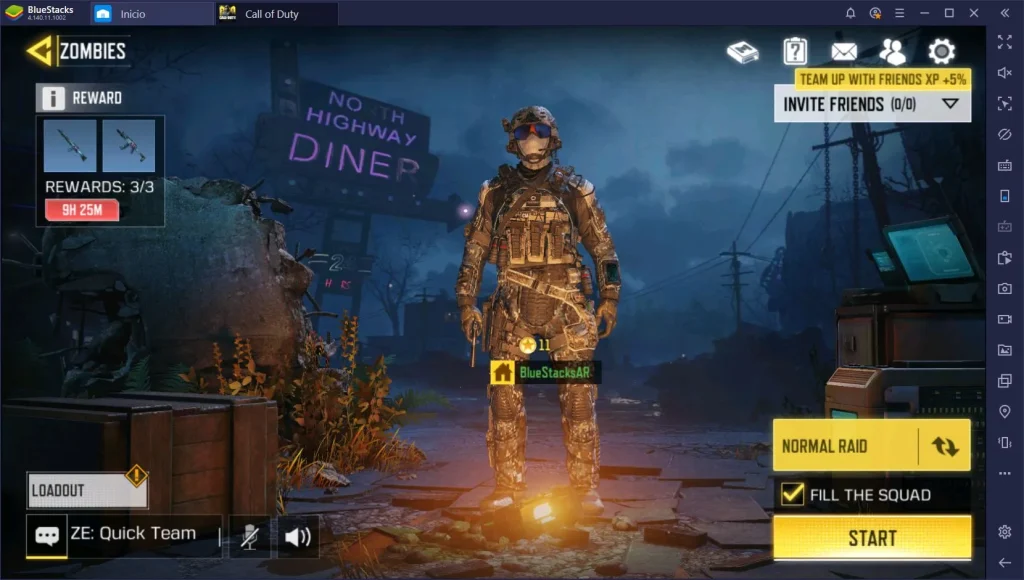
The game also offers a Battle Royale mode for up to 100 players, complete with vehicles, diverse weapons, and large-scale maps. For players who enjoy PvE challenges, COD Mobile also includes Zombies mode (seasonal) and limited-time events that keep the game fresh. The blend of classic Call of Duty gameplay with mobile-first features makes it a perfect title for PC gamers looking to relive console-quality shooting action.
Key Features
1. Classic Call of Duty Multiplayer Maps
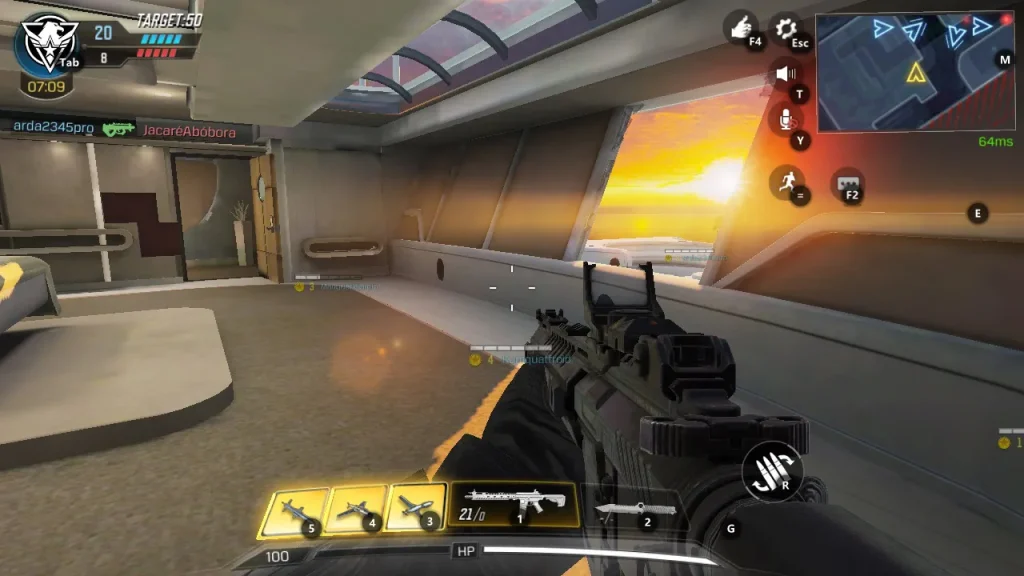
One of the biggest attractions of Call of Duty Mobile PC is the return of legendary maps like Nuketown, Hijacked, Crash, and Crossfire. These maps are carefully recreated from the console versions and adapted for competitive play. Whether you prefer tight, close-quarters combat or open areas for sniping, each map brings a nostalgic yet thrilling experience.
2. Intense Battle Royale Mode
COD Mobile’s Battle Royale mode offers a massive arena where up to 100 players fight for survival. The map includes multiple terrains, vehicles, and loot areas that keep matches unpredictable. Playing on PC enhances this mode further with smooth graphics, faster reaction times, and easier navigation using keyboard and mouse controls.
3. Wide Range of Weapons and Loadouts
Players can access an extensive arsenal of weapons, from assault rifles and SMGs to sniper rifles and shotguns. On PC, customizing loadouts becomes easier with clear menus and faster setup. You can also add attachments, perks, and scorestreaks, giving you the flexibility to adapt your playstyle for different modes and enemies.
4. Competitive Ranked Matches
For players who love a challenge, the Ranked mode is where COD Mobile truly shines. Compete against skilled players worldwide to climb the leaderboards and earn rewards. Playing ranked on PC ensures better control accuracy and faster reflexes, giving you an advantage in tightly contested matches.
5. Seasonal Updates and Events
COD Mobile is constantly evolving with seasonal content updates. These updates bring new weapons, operators, skins, and game modes, ensuring the game never feels repetitive. On PC, you can enjoy these updates in higher resolution and longer sessions without worrying about battery drain or mobile performance issues.
6. Cross-Platform Progression
By linking your Activision account, your progress, unlocked items, and achievements sync across both mobile and PC. This means you can seamlessly switch between devices, making it convenient to continue your game whether you’re on the go or at your computer.
7. Free-to-Play Accessibility
Best of all, Call of Duty Mobile PC version is completely free to download and play. While optional in-app purchases are available for skins, weapons, and battle passes, none of them affect the core gameplay. This makes COD Mobile one of the most accessible and enjoyable shooters available today.
Why Play Call of Duty Mobile on PC?
Playing Call of Duty Mobile PC enhances your gaming experience significantly. With better graphics, smoother frame rates, and customizable controls, it feels closer to the traditional console/PC COD experience.
Additionally, gaming on a PC removes mobile restrictions like battery drain, overheating, and limited storage space. Add in the comfort of a large display and responsive mouse-keyboard setup, and you’ve got the perfect competitive environment to dominate matches.

How to Download Call of Duty Mobile on PC
Here is a step by step guide to download Call of Duty Mobile on PC;
- Find the button: Scroll to the “Download Call of Duty Mobile for PC” button on this page.
- Start the safe download: Click the button to begin the safe download from this page. When prompted, choose Save (not Open) and pick a familiar folder (e.g., Downloads).
- Locate the file: When the download finishes, open your Downloads folder and find the .zip (or .rar) archive.
- Extract the game: Right-click the archive → Extract All… (or use 7-Zip/WinRAR) → choose a destination folder.
- Open the folder: Go to the extracted folder and look for Call of Duty Mobile.exe.
- Launch the game: Double-click the .exe to start. If Windows SmartScreen appears, select More info → Run anyway (only if you downloaded from the button on this page).
- Set up controls & video: In the Options/Settings menu, choose your resolution/fullscreen, adjust audio latency, and confirm keyboard bindings (← → ↑ ↓).
- Create a shortcut (optional): Right-click Call of Duty Mobile.exe → Send to → Desktop (create shortcut) for quick access.
- Play & enjoy: Start Story Mode or Free Play, and you’re good to go!
How to Play Call of Duty Mobile on PC
Once installed, you’ll notice how fluid the game feels with PC controls. Emulators like Gameloop come with pre-configured key mappings, so movement, aiming, and shooting work seamlessly.
Players can also customize key bindings to match their personal playstyle. With PC hardware handling the graphics, you can enjoy higher FPS (frames per second), sharper visuals, and zero lag compared to most mobile devices. Whether you’re in Battle Royale or ranked multiplayer, the competitive advantage of playing on PC is undeniable.

System Requirements
Minimum Requirements:
- OS: Windows 7/8/10 (64-bit)
- CPU: Intel Core i3 (2.4GHz) or equivalent
- RAM: 4GB
- GPU: Intel HD Graphics 4000 or better
- Storage: 5GB free space
Recommended Requirements:
- OS: Windows 10/11 (64-bit)
- CPU: Intel Core i5 or Ryzen 5
- RAM: 8GB or higher
- GPU: NVIDIA GeForce GTX 660 / AMD Radeon HD 7850 or better
- Storage: 10GB free space
FAQs
How can I download Call of Duty Mobile PC?
To play Call of Duty Mobile PC, you need an Android emulator like Gameloop (official COD Mobile emulator), BlueStacks, or LDPlayer. Simply download and install the emulator, log in with your Google account, search for COD Mobile in the Play Store, and install it. You can also use the download button on this page for a direct and safe download.
Is Call of Duty Mobile PC version free?
Yes, Call of Duty Mobile is 100% free to download and play on PC through emulators. The game itself does not require any purchase. However, it does include optional in-game purchases such as weapon skins, character outfits, and battle passes that enhance your experience but are not mandatory.
Which emulator is best for Call of Duty Mobile on computer?
The best option is Gameloop, since it’s the official emulator optimized for Call of Duty Mobile by Tencent Games. It comes with pre-set controls and smoother gameplay. Alternatives like BlueStacks and LDPlayer also perform well, especially if you want more customization options or run COD Mobile on different PC setups.
Can I play Call of Duty Mobile on PC without an emulator?
Currently, there is no official standalone PC version of COD Mobile. The only way to play is through an Android emulator. Emulators like Gameloop are safe, free, and specifically optimized for gaming, so they provide a smooth experience comparable to playing on a console or desktop shooter.
Does Call of Duty Mobile support cross-platform play on PC?
Yes. By linking your Activision account, you can sync progress across devices. This means you can play on mobile when you’re away and continue your progress on PC through the emulator. You can also team up with friends who are playing on mobile, ensuring you never miss out on multiplayer matches.
What are the system requirements for Call of Duty Mobile PC version?
For minimum settings, you’ll need Windows 7/8/10, an Intel Core i3 processor, 4GB RAM, Intel HD Graphics 4000, and 5GB storage. For recommended performance, use Windows 10/11, an Intel Core i5 or Ryzen 5, 8GB RAM, and a dedicated GPU like GTX 660 or Radeon HD 7850 with at least 10GB storage free.
Is it safe to download Call of Duty Mobile on PC?
Yes, it is completely safe as long as you use trusted emulators like Gameloop, BlueStacks, or LDPlayer. Downloading from the button provided on this page ensures you get the official, virus-free version of the game. Avoid third-party or unofficial sources to protect your PC from malware or performance issues.
Alternatives to Call of Duty Mobile on PC
- PUBG Mobile PC – Another popular battle royale shooter offering intense survival gameplay with realistic maps and weapon mechanics.
- Free Fire PC – A fast-paced battle royale game optimized for lower-end systems, ideal for quick matches.
- Modern Combat 5 PC – A futuristic FPS with great graphics and thrilling multiplayer action.
- Critical Ops PC – Tactical shooter focusing on skill-based gameplay similar to Counter-Strike.
- Apex Legends Mobile PC – Combines battle royale and hero-shooter mechanics with unique character abilities.
Conclusion
Call of Duty Mobile PC is the perfect way to experience Activision’s iconic FPS with enhanced graphics, smooth controls, and unlimited playtime. By using trusted emulators like Gameloop or BlueStacks, you can enjoy competitive battles, classic maps, and exciting modes right on your computer. With cross-platform syncing, you won’t lose progress and can easily switch between devices. Whether you’re a casual gamer or a ranked competitor, the PC version gives you the ultimate edge. Click the download button on this page today and start dominating the battlefield with precision, speed, and unbeatable performance!