Rise of Kingdoms PC
Experience Rise of Kingdoms on your PC: build your empire, choose historical civilisations, and play with keyboard/mouse for free.
If you’ve ever dreamed of commanding legendary warriors and shaping the fate of great empires, Rise of Kingdoms PC brings that dream vividly to life. Developed by Lilith Games, this free-to-play real-time strategy game has captured the imagination of millions of players worldwide. Originally launched as a mobile title, Rise of Kingdoms quickly became one of the most popular strategy games ever released boasting over 100 million downloads globally and an active community of passionate strategists. The game’s blend of historical authenticity, real-time combat, and deep city-building mechanics make it a standout experience in the genre. Now, with the official Rise of Kingdoms PC version, players can enjoy that same excitement on a bigger screen with smoother performance, enhanced graphics, and improved controls.
What makes Rise of Kingdoms on PC so appealing is the way it transforms a great mobile game into a full-scale PC experience. While the core gameplay remains the same building cities, leading troops, forging alliances, and exploring a massive open world the PC platform enhances every aspect. Players can now take advantage of a larger display, making it easier to manage troops and oversee complex battles in real time. Keyboard and mouse inputs replace clumsy touch gestures, giving players precise control when directing armies or navigating the world map. Whether you’re battling alongside your alliance in kingdom wars or exploring mysterious fog-covered lands, the PC version of Rise of Kingdoms delivers clarity, speed, and depth that mobile simply can’t match.
Moreover, playing Rise of Kingdoms on computer opens the door to better multitasking and longer gaming sessions without worrying about battery drain or overheating. You can chat with allies, watch live streams, or coordinate strategies across multiple windows—all while your kingdom thrives in the background. Cross-platform syncing ensures that your progress is always safe; you can seamlessly switch between PC and mobile using the same account. The ability to enjoy extended play sessions with crystal-clear visuals, real-time control, and uninterrupted focus is a major reason why thousands of players are now choosing to download Rise of Kingdoms for PC. Whether you’re a veteran governor or a curious newcomer ready to build your first civilization, the desktop version is hands-down the ultimate way to experience this epic strategy masterpiece. So, prepare your armies, fortify your city, and embark on the conquest of a lifetime your empire awaits on PC.
Gameplay Overview
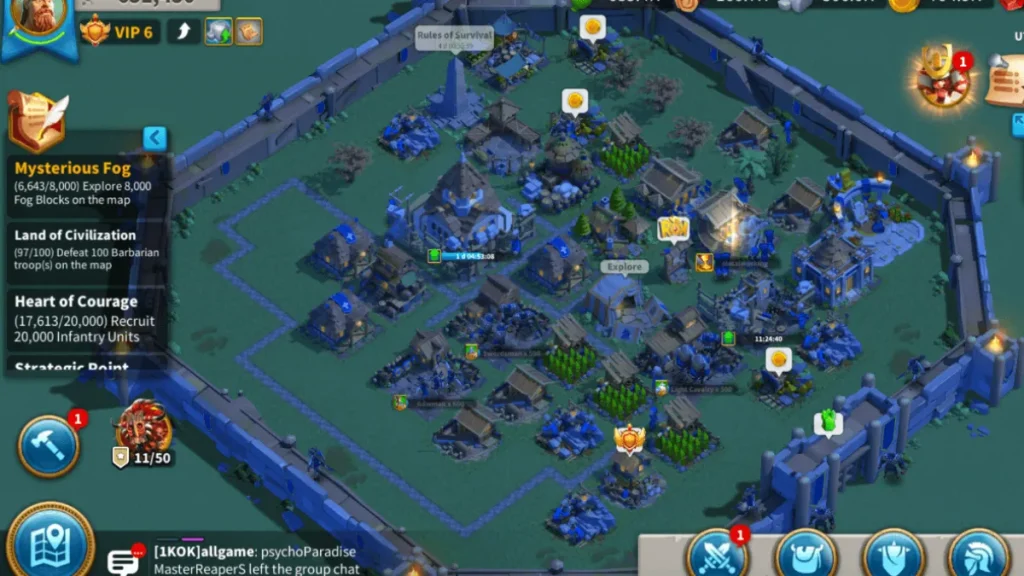
Rise of Kingdoms PC is a real-time strategy game where players build, expand, and command their own civilizations across a massive living world. When you start, you’ll choose from a roster of legendary civilizations such as China, Rome, Greece, Vikings, and Egypt each with distinct architectural styles, special units, and unique commanders inspired by real history. From your humble city center, you’ll gather resources, construct buildings, train troops, and research technologies to strengthen your empire. As you progress through the ages, you unlock more advanced structures, powerful upgrades, and special abilities that define your civilization’s personality and playstyle. Every decision from how you allocate your resources to which commanders you develop shapes the destiny of your kingdom.
The action truly comes alive in Rise of Kingdoms on PC, where the entire world map operates as one continuous, real-time battlefield. Troops move freely, alliances coordinate large-scale wars, and every conflict unfolds dynamically—no separate loading screens or isolated stages. Players can scout mysterious fog-covered territories, discover villages and barbarian camps, or join epic alliance rallies to claim new lands. Because the Rise of Kingdoms PC version offers smoother graphics and precision controls, it’s easier to manage multiple armies, plan tactical maneuvers, or respond instantly to enemy invasions. You can zoom out to oversee global movements or dive into close-up skirmishes where your commanders unleash signature abilities in cinematic fashion. Whether you’re defending your walls, conquering rival cities, or cooperating with allies in massive kingdom events, the PC gameplay experience amplifies everything that makes Rise of Kingdoms one of the most immersive strategy titles of its generation.

Key Features
1. Choose from 14 Historical Civilizations
One of the most exciting aspects of Rise of Kingdoms PC is the freedom to choose from 14 historically inspired civilizations, including Rome, China, Greece, Vikings, Egypt, Arabia, and Britain. Each civilization has its own unique architectural style, special troops, and starting commander. For example, the Romans excel in infantry defense, while the Vikings focus on powerful offense. This diversity encourages players to experiment and find a playstyle that matches their strategic mindset. The civilization you pick at the beginning shapes your empire’s growth, culture, and strengths throughout your campaign.
2. Legendary Commanders and Heroes
The Rise of Kingdoms PC version features a vast roster of legendary commanders drawn from real-world history, such as Sun Tzu, Julius Caesar, Joan of Arc, and Alexander the Great. Each commander possesses unique abilities and a skill tree that allows for deep customization. Players can level up commanders, unlock special talents, and equip them with powerful gear to enhance combat performance. Pairing the right commanders with compatible troops can be the key to victory in both PvE and PvP battles.
3. Real-Time Strategic Battles
Unlike turn-based strategy titles, Rise of Kingdoms PC thrives on real-time action. Every battle occurs seamlessly on an open world map shared by all players. You can see troops marching, allies rallying, and enemies attacking in real time. The ability to zoom in and out, monitor different fronts, and issue commands simultaneously makes the PC experience far more tactical. With mouse precision and fast response, you can split armies, coordinate ambushes, or quickly reinforce allies.
4. Deep City-Building and Economic Management
Your city is the heart of your empire. Construct and upgrade buildings such as barracks, farms, hospitals, and research centers to sustain growth and military strength. Resource management is crucial wood, food, stone, and gold determine how fast your civilization advances. On Rise of Kingdoms PC, managing these systems is easier and more efficient thanks to intuitive mouse controls and larger screen space, allowing you to oversee your city’s expansion in detail.

5. Exploration and the “Fog of War”
The game world is shrouded in fog when you begin, and only by sending out scouts can you uncover new lands, villages, and enemy hideouts. Exploration rewards you with resources, quests, and strategic advantages. The real-time map and enhanced PC visuals make exploration a true adventure, as you watch your scouts discover breathtaking landscapes and hidden treasures.
6. Alliance System and Cooperative Warfare
Teamwork defines success in Rise of Kingdoms PC. Players can join alliances to collaborate in battles, share resources, and expand collective territory. Alliances can capture holy sites, construct flags, and participate in kingdom-versus-kingdom wars. On PC, coordinating these massive events becomes smoother and faster, letting players plan and execute large-scale strategies effortlessly.
7. Cross-Platform Sync and Enhanced PC Performance
One of the best reasons to download Rise of Kingdoms for PC is the seamless account sync between mobile and desktop. Whether you start on your phone or continue on your computer, all your progress remains intact. The PC version offers better frame rates, sharper visuals, and no battery limitations perfect for long strategy sessions. With its optimization for Windows systems, the game runs smoothly even during massive alliance battles.
Why Play Rise of Kingdoms on PC?
Playing Rise of Kingdoms on PC takes the already incredible mobile experience and amplifies it in every possible way. The first and most noticeable improvement is visual clarity the expansive world map, intricate city details, and animated battles look far more vivid on a larger screen. When you’re commanding troops or managing resources, having that wider perspective gives you a genuine tactical advantage. PC hardware also eliminates the performance limitations of mobile devices: no lag spikes, no overheating, and no battery drain during intense alliance wars. This means you can play for longer sessions with smooth performance, vibrant graphics, and enhanced sound quality. Whether you’re exploring fog-covered territories or coordinating with allies across continents, the PC platform ensures every action feels faster, cleaner, and more immersive.
Beyond visuals and performance, the Rise of Kingdoms PC version introduces precise control and multitasking power that mobile simply can’t match. Keyboard and mouse inputs make it easier to manage multiple armies, build cities efficiently, and switch between windows for chat, maps, or strategy planning. You can even keep the game running in the background while browsing guides or chatting with your alliance perfect for dedicated governors who like to strategize while staying connected. Another major advantage is cross-platform syncing: your account progress seamlessly transfers between mobile and PC, allowing total flexibility. If you truly want to experience Rise of Kingdoms the way it was meant to be played fast, fluid, and visually stunning then playing Rise of Kingdoms on computer is the best choice. It’s not just an upgrade; it’s the definitive way to rule your empire.
How to Download Rise of Kingdoms on PC
Here is a step by step guide to downloadRise of Kingdoms on PC;
- Find the button: Scroll to the “Download Rise of Kingdoms for PC” button on this page.
- Start the safe download: Click the button to begin the safe download from this page. When prompted, choose Save (not Open) and pick a familiar folder (e.g., Downloads).
- Locate the file: When the download finishes, open your Downloads folder and find the .zip (or .rar) archive.
- Extract the game: Right-click the archive → Extract All… (or use 7-Zip/WinRAR) → choose a destination folder
- Open the folder: Go to the extracted folder and look for Rise of Kingdoms.exe
- Launch the game: Double-click the .exe to start. If Windows SmartScreen appears, select More info → Run anyway (only if you downloaded from the button on this page).
- Set up controls & video: In the Options/Settings menu, choose your resolution/fullscreen, adjust audio latency, and confirm keyboard bindings (← → ↑ ↓).
- Create a shortcut (optional): Right-click Rise of Kingdoms .exe → Send to → Desktop (create shortcut) for quick access.
- Play & enjoy: Start Story Mode or Free Play, and you’re good to go!
How to Play Rise of Kingdoms on PC
Once you’ve successfully installed and launched the Rise of Kingdoms PC version, it’s time to step into your new role as a ruler and strategist. After logging in with your linked account, you’ll begin by choosing a civilization each offering unique bonuses and commanders that will shape your playstyle. Start by constructing essential buildings like farms, barracks, and academies to gather resources and train troops. The early game focuses on growth and expansion: upgrade your city hall, unlock new technologies, and complete missions to gain rewards. The intuitive PC interface makes these management tasks much easier, allowing you to navigate menus, zoom across your city, and queue upgrades with just a few clicks. Keyboard shortcuts can also help you switch between views or issue commands quickly, ensuring smoother gameplay and better control over your empire.
In the world map view, you’ll see an enormous open field filled with other players, alliances, and wild barbarians. This is where the true excitement of Rise of Kingdoms on PC comes alive. Use your mouse to direct troops, scout hidden territories, and join alliance rallies for coordinated attacks. Since the game operates in real time, every decision matters your timing and strategy determine victory or defeat. Playing Rise of Kingdoms on computer also lets you multitask more effectively, whether you’re chatting with alliance members, watching tutorials, or managing multiple troop deployments. As you progress, you’ll participate in events, wars, and cross-kingdom battles that demand quick thinking and coordination. With smoother controls, larger visuals, and faster response times, Rise of Kingdoms PC delivers the ultimate kingdom-building and war-commanding experience for both new and veteran players alike.
System Requirements
Minimum Requirements:
- OS: Windows 7/8/10 or MacOS (for emulator)
- CPU: Intel/AMD dual-core
- RAM: 4 GB
- Storage: 5–10 GB free space (SSD recommended)
- Graphics: Integrated GPU compatible with DirectX 11
Recommended Requirements:
- OS: Windows 10/11
- CPU: Modern four-core (e.g., Intel i5 or equivalent)
- RAM: 8–16 GB
- Storage: SSD with 10 GB+ free
- Graphics: Dedicated GPU (NVIDIA/AMD) capable of high-fps rendering
Meeting the recommended specs will ensure smooth performance, quick load times and a better gaming experience on the PC version.
FAQs
Is Rise of Kingdoms free to play on PC?
Yes, Rise of Kingdoms PC is completely free to play. The game follows a free-to-play model with optional in-game purchases for cosmetic items, speed-ups, or premium commanders. You can enjoy all core gameplay features city building, exploration, alliance wars, and real-time combat without spending any money. While purchasing in-game packs can accelerate progress, it’s entirely possible to grow strong and competitive through smart strategy and consistent gameplay. The PC version of Rise of Kingdoms offers the same free-to-play structure as the mobile edition, with the added benefit of enhanced visuals and smoother performance.
How do I download and install Rise of Kingdoms on PC?
To download Rise of Kingdoms for PC, click the secure download button provided in this article or visit the official Lilith Games website. Once the installer downloads, run it and follow the on-screen setup instructions. You can install the game directly through the official PC client or use an Android emulator like BlueStacks or LDPlayer if you prefer. After installation, log in with your existing Lilith ID, Google, or Facebook account to sync your progress. The setup takes only a few minutes, and once completed, you can immediately start building your empire on your computer.
Can I use my mobile account on the PC version?
Absolutely! Rise of Kingdoms on PC fully supports cross-platform synchronization. As long as your mobile game is linked to a Lilith ID, Google, or Facebook account, you can log in to the PC version and access all your progress instantly. That includes your city, commanders, troops, resources, and alliance membership. This seamless syncing allows you to switch between mobile and PC effortlessly, ensuring you can play anywhere without losing momentum.
What are the benefits of playing Rise of Kingdoms on computer?
Playing Rise of Kingdoms on computer gives you numerous advantages over mobile gameplay. You get sharper graphics, a larger display, and precise control using a keyboard and mouse perfect for managing multiple armies and navigating the world map. The PC version eliminates issues like battery drain, overheating, or lag, allowing for longer and smoother gaming sessions. You can also multitask easily chat with allies, manage multiple accounts, or watch strategy videos while the game runs in the background. In short, it’s a superior, more comfortable way to play.
Do I need an emulator to play Rise of Kingdoms on PC?
No, you don’t necessarily need an emulator anymore. Lilith Games has released an official Rise of Kingdoms PC version that you can install directly. However, if you’re a Mac user or prefer emulator features like multiple instances or custom key mapping, emulators such as BlueStacks or LDPlayer are still excellent options. Both the official client and emulator versions perform well, but the dedicated PC client generally offers smoother optimization and easier account linking.
Are there any special features exclusive to the PC version?
Yes. The Rise of Kingdoms PC version comes with several enhancements tailored for desktop play. These include full-screen HD visuals, improved frame rates, customizable keyboard shortcuts, and multi-instance support for managing different accounts simultaneously. Additionally, the PC client integrates better with Windows OS for stability and efficient performance during massive alliance wars. All these features combine to create a polished and immersive experience that surpasses mobile gameplay.
Is Rise of Kingdoms PC safe to download and play?
Yes, as long as you download Rise of Kingdoms for PC from trusted sources such as the official Lilith Games website or verified partners like BlueStacks it’s completely safe. Avoid downloading from unofficial third-party sites, as they might contain modified or harmful files. The official version is secure, verified, and regularly updated with the latest patches and events. Plus, your account data is protected through secure login systems and cross-platform linking options.
Alternatives to Rise of Kingdoms on PC
If you enjoy the genre and want variety, here are five similar strategy games worth checking out:
- Age of Empires IV – A classic PC RTS series brought into modern times with deep historical campaigns and multiplayer skirmishes.
- Civilization VI – A turn-based grand strategy title where you build a civilization from ancient times to the future, with rich tech trees and diplomacy.
- Clash of Clans (on PC via emulator) – If you like building and raiding mechanics, this mobile favourite can be played on PC through emulators.
- Total War: Warhammer III – For those who want massive battles, fantasy factions, and real-time tactics combined with strategic layers.
- Kingdom Under Fire II – A hybrid strategy/RTS with large-scale warfare and hero units, offering a different flavour of real-time strategy.
Conclusion
Rise of Kingdoms PC transforms the hit mobile strategy game into a richer, more immersive experience for desktop players. With its stunning graphics, real-time battles, and deep civilization-building mechanics, the PC version gives you the perfect platform to strategize, explore, and conquer without the limitations of a small screen or drained battery. You can enjoy smoother performance, intuitive keyboard and mouse controls, and seamless cross-platform syncing making it easier than ever to lead your empire to victory. Whether you’re a veteran governor or just starting your journey, this is the ultimate way to experience Rise of Kingdoms on PC. Don’t wait—click the Download Rise of Kingdoms for PC button above and start building your powerful civilization today. Your rise to greatness begins now!