Blur PC
Experience high-speed arcade racing with real cars and combat power-ups. Download Blur for PC and enjoy intense racing action on your computer.
Released in 2010, Blur quickly earned a cult following for doing something few racing games dared to attempt: blending realistic licensed cars with explosive arcade-style vehicular combat. Developed by Bizarre Creations and published by Activision, the game offered a fresh alternative to traditional simulation racers and over-the-top kart racers. Instead of focusing purely on realism or fantasy, it found a perfect middle ground real cities, real cars, and unreal chaos powered by tactical combat mechanics.
What truly made the game stand out was its power-up system. Borrowing inspiration from arcade combat racers while maintaining authentic driving physics, it introduced shields, mines, nitro boosts, EMP blasts, and shock attacks into competitive street racing. This combination created intense, skill-based races where reflexes, positioning, and smart power-up usage mattered just as much as raw driving ability. Even years after release, many players still consider it one of the most innovative arcade racers ever made.
Playing the game on PC elevates the experience even further. A larger display enhances track awareness, higher frame rates improve responsiveness, and keyboard or controller flexibility allows players to choose their preferred setup. Multitasking, stable performance, and community-driven fixes also make the PC version attractive for modern gamers. If you’ve been searching for a high-energy racing title that mixes speed with strategy, there’s a safe download button available on this page to help you get started quickly.
Gameplay Overview
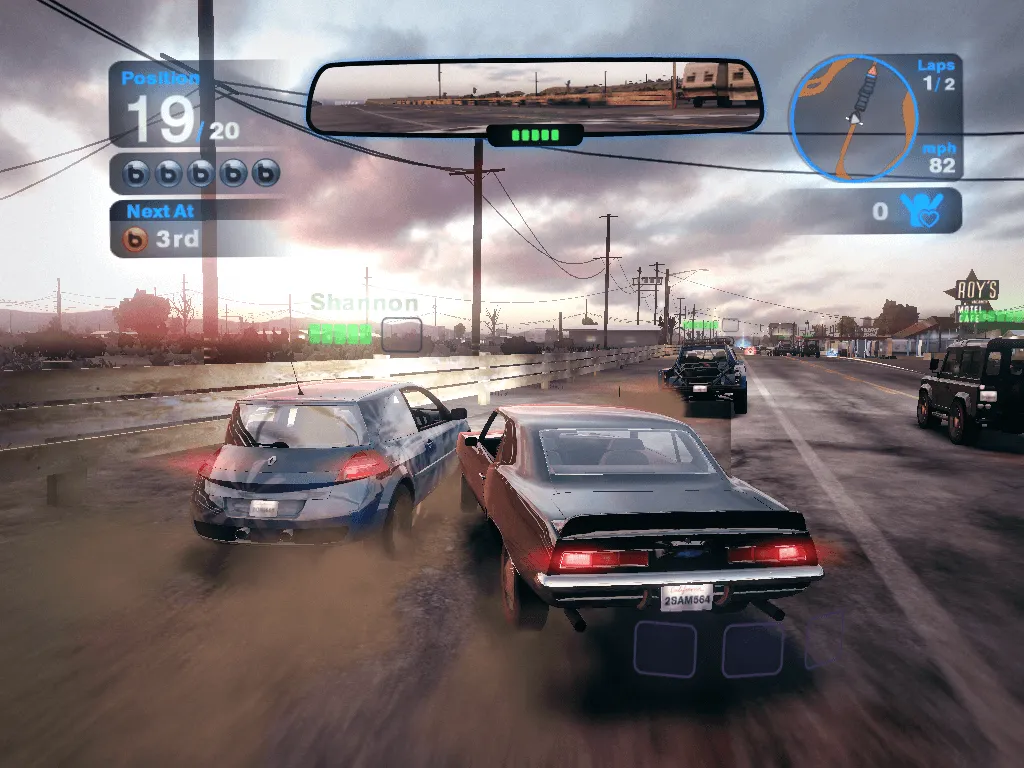
The core gameplay revolves around fast-paced circuit racing mixed with real-time combat. Players race through beautifully recreated real-world locations while collecting power-ups scattered across the track. These power-ups range from defensive shields to offensive attacks that can disable, damage, or slow opponents. Unlike traditional arcade racers where chaos dominates, every power-up here requires timing and precision, rewarding skillful play rather than random luck.
Races are structured across multiple modes, including standard racing, elimination events, time trials, and intense multiplayer competitions. The handling model strikes a balance between realism and accessibility, making cars feel weighty without becoming difficult to control. Drifting, drafting, and boost management all play a role in securing victory. Whether you’re climbing the single-player career ladder or competing against others, the gameplay remains consistently thrilling and competitive.
Key Features
1. Arcade-Style Racing with Real Licensed Cars
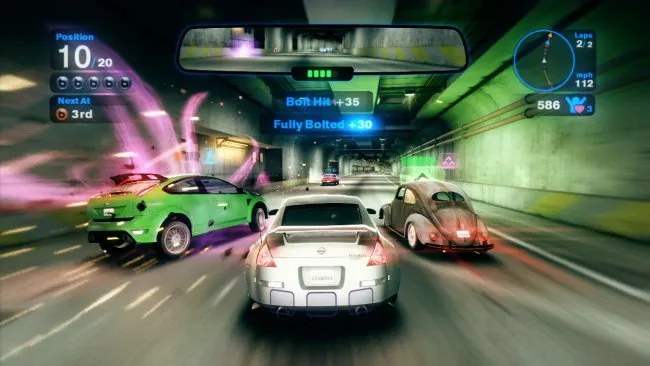
One of the biggest strengths of Blur is how it blends arcade racing chaos with real-world licensed vehicles. Instead of cartoon cars, you drive authentic models from well-known manufacturers, each with its own handling and performance traits. This makes the game instantly appealing to players who enjoy realistic cars but don’t want the strict simulation rules of hardcore racing games. The result is fast, aggressive racing that feels grounded yet wildly entertaining.
2. Unique Power-Up Based Combat System
Unlike traditional racers, this game introduces a deep power-up system that adds a strategic layer to every race. Players can collect offensive, defensive, and boost-based abilities while driving, such as shields, shock attacks, mines, and nitro bursts. You can carry multiple power-ups at once and decide when to use them, making timing and decision-making just as important as pure driving skill. This system keeps races unpredictable and highly competitive.
3. Skill-Based Racing That Rewards Precision
While the game looks chaotic, success is heavily skill-based. Power-ups are not random wins—they require accuracy, positioning, and awareness. Skilled players can dodge attacks, counter opponents, and chain abilities effectively to maintain the lead. Drifting, drafting, and boost management all matter, ensuring that experienced racers are consistently rewarded for smart play rather than luck.
4. Real-World Inspired City Tracks
The tracks are inspired by real-world cities, offering a more authentic atmosphere compared to fictional circuits. Urban environments, tight corners, wide highways, and elevation changes create varied racing experiences. These locations feel alive and immersive, enhancing the sense of speed and danger. For new players, learning track layouts becomes an important part of improving lap times and race results.
5. Competitive Single-Player Career Mode
The single-player career mode is designed to gradually introduce mechanics while offering long-term progression. Players earn fan points based on performance, which unlock new events, vehicles, and challenges. The difficulty scales naturally, making it accessible for beginners while still offering a challenge for advanced players. This structured progression keeps players engaged and motivated to improve their skills.
6. Intense Multiplayer Experience
Multiplayer is where the game truly shines. Racing against real players adds tension, unpredictability, and excitement that AI opponents can’t replicate. Every race becomes a test of reflexes and strategy, as human opponents use power-ups creatively and aggressively. Whether playing locally or online, multiplayer races deliver fast-paced action and endless replay value.
7. Optimized PC Gameplay and Controls
On PC, players benefit from smoother performance, customizable graphics settings, and flexible control options. Keyboard and controller support allow players to choose what feels most comfortable. Higher frame rates and sharper visuals improve responsiveness, making competitive racing more enjoyable. These enhancements make the PC version ideal for both casual play sessions and long competitive runs.
Why Play Blur on PC?
Playing Blur on PC delivers a noticeably superior experience compared to console versions, especially for players who value performance, control flexibility, and visual clarity. On PC, the game benefits from higher resolutions and smoother frame rates, which make high-speed racing easier to read and more responsive. Tracks, cars, and visual effects appear sharper on larger monitors, allowing players to better anticipate corners, power-up pickups, and incoming attacks. This visual advantage is particularly important in a fast-paced arcade racer where split-second reactions can decide the outcome of a race. Additionally, PC hardware allows you to fine-tune graphics settings for stable performance, ensuring smooth gameplay even during intense multiplayer moments filled with explosions and power-up effects.
Control flexibility is another major reason gamers prefer playing this title on PC. Players can choose between keyboard, mouse, or controller setups depending on personal preference. Keyboard controls provide precise input for experienced racers, while controllers offer a more traditional racing feel with analog steering and acceleration. Unlike consoles, PC gaming also removes concerns like battery drain or hardware limitations during long sessions. You can race for hours without interruptions, multitask easily, and even run background applications such as voice chat or streaming software. This freedom makes PC gaming more convenient and comfortable, especially for competitive or long-term players.
How to Download Blur on PC
Here is a step by step guide to download Blur on PC;
- Find the button: Scroll to the “Download Blur for PC” button on this page.
- Start the safe download: Click the button to begin the safe download from this page. When prompted, choose Save (not Open) and pick a familiar folder (e.g., Downloads).
- Locate the file: When the download finishes, open your Downloads folder and find the .zip (or .rar) archive.
- Extract the game: Right-click the archive → Extract All… (or use 7-Zip/WinRAR) → choose a destination folder
- Open the folder: Go to the extracted folder and look for Blur.exe
- Launch the game: Double-click the .exe to start. If Windows SmartScreen appears, select More info → Run anyway (only if you downloaded from the button on this page).
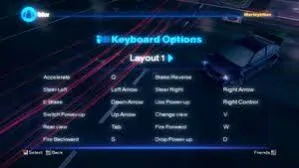
- Set up controls & video: In the Options/Settings menu, choose your resolution/fullscreen, adjust audio latency, and confirm keyboard bindings (← → ↑ ↓).
- Create a shortcut (optional): Right-click Blur .exe → Send to → Desktop (create shortcut) for quick access.
- Play & enjoy: Start Story Mode or Free Play, and you’re good to go!
How to Play Blur on PC
Playing Blur on PC starts with understanding the balance between driving skill and smart power-up usage. Once the game is installed and launched, you’ll enter the main menu where you can access career mode, quick races, and multiplayer options. New players should begin with the career mode, as it gradually introduces core mechanics, vehicle handling, and combat systems. Early races help you learn how different cars feel on the track, how drifting affects speed, and how boost management works. As you race, you’ll notice power-ups appearing on the track collecting these is essential. You can store multiple power-ups at once, allowing you to plan attacks or defenses instead of using them immediately. Learning when to deploy shields, shock attacks, or speed boosts is crucial, as poor timing can leave you vulnerable to opponents.
To improve performance on PC, it’s important to adjust settings before diving into competitive races. Open the options menu to configure graphics and controls based on your system. Higher frame rates improve responsiveness, which is especially useful during close combat situations. You can choose between keyboard controls or a controller depending on what feels more comfortable. Keyboard players benefit from precise directional inputs, while controllers provide smoother steering through analog sticks. During races, focus on maintaining speed through clean driving lines while keeping an eye on your power-up inventory. Defensive play is just as important as offense using shields at the right moment or dodging attacks can protect your lead. As you progress, races become more aggressive, requiring better awareness of opponents and smarter use of abilities. With practice, mastering drifting, boost timing, and power-up combinations will help you consistently place higher and enjoy the full arcade racing experience on PC.
System Requirements
Minimum Requirements
- OS: Windows 7
- Processor: Intel Core 2 Duo
- RAM: 2 GB
- Graphics: NVIDIA GeForce 6600
- Storage: 14 GB available space
Recommended Requirements
- OS: Windows 10
- Processor: Intel Core i5
- RAM: 4 GB
- Graphics: NVIDIA GeForce GTX 750
- Storage: 14 GB SSD
FAQ
Is Blur available on PC?
Yes, Blur is fully playable on PC. The game was officially released for Windows and supports standard PC hardware. Although it’s an older title, it can still run smoothly on modern systems with proper compatibility settings. Many players continue to enjoy the PC version due to its performance flexibility and control options.
Can I play Blur on PC using a controller?
Yes, the PC version supports controllers, including Xbox-compatible gamepads. Using a controller provides analog steering and acceleration, which many players find more comfortable for racing games. You can also customize button mappings to suit your playstyle. Keyboard controls are available as well, giving players full freedom to choose their preferred setup.
Does Blur support offline gameplay on PC?
Absolutely. You can play Blur offline on PC without any internet connection. The single-player career mode, quick races, and local multiplayer options are fully accessible offline. This makes it a great choice for players who prefer solo progression or local competitive play without relying on online servers.
Is Blur multiplayer still playable on PC?
Multiplayer functionality depends on setup. Offline multiplayer and LAN modes work reliably on PC, allowing players to race against friends locally. Online multiplayer may require additional configuration or community solutions, as official servers are no longer actively supported. Despite this, many players still enjoy competitive racing through local or private setups.
Does Blur run well on modern Windows versions?
Yes, Blur runs on modern Windows versions such as Windows 10 and Windows 11. In some cases, players may need to enable compatibility mode or apply minor fixes to ensure stable performance. Once configured, the game runs smoothly and benefits from higher resolutions and improved frame rates on newer hardware.
Is Blur more arcade-focused or realistic?
Blur is primarily an arcade-style racing game, but it uses real licensed cars and realistic environments. The handling is accessible rather than simulation-heavy, making it easy for beginners to pick up. At the same time, the power-up system and skill-based mechanics provide enough depth to keep experienced players engaged.
Is Blur suitable for casual gamers on PC?
Yes, Blur is very suitable for casual gamers. The learning curve is friendly, and early races help new players understand driving and power-up mechanics without overwhelming difficulty. Players can enjoy short race sessions, experiment with different cars, and gradually improve their skills, making it ideal for both casual and competitive audiences.
Alternatives to Blur on PC
Split/Second
A cinematic racer focused on environmental destruction and explosive set pieces.
Burnout Paradise
High-speed crashes, open-world exploration, and adrenaline-fueled racing.
Need for Speed Hot Pursuit
Police chases and arcade speed with licensed supercars.
Driver: San Francisco
Unique gameplay mechanics mixed with story-driven driving challenges.
FlatOut 2
A classic arcade racer known for destruction physics and chaotic races.
Conclusion
Blur remains one of the most unique arcade racing experiences ever released, combining real cars, real locations, and strategic combat into one thrilling package. The PC version offers enhanced performance, flexible controls, and long-term playability, making it the best way to experience the game today. If you enjoy competitive racing with a tactical edge, this title delivers nonstop excitement. Use the download button available in this article to safely install the game and jump straight into high-speed, power-up-driven action.