Papa’s Freezeria Deluxe PC
Enjoy Papa’s Freezeria Deluxe PC with smooth controls, fun time-management gameplay, seasonal content, and offline play in this complete ice-cream simulation.
Few casual games have managed to stay as beloved and recognizable as Papa’s Freezeria Deluxe, a charming time-management simulation that blends creativity, speed, and strategy into one addictive experience. Developed by Flipline Studios, this Deluxe edition is a modernized and expanded version of the classic browser hit that helped define the Papa Louie. With refreshed visuals, smoother controls, and deeper progression systems, the PC version gives fans a polished way to enjoy the ice-cream-making chaos on a larger screen.
Over the years, Papa’s Freezeria has built a massive fanbase thanks to its simple concept and satisfying gameplay loop. Players take charge of a beachside ice cream shop, preparing custom sundaes by blending, mixing, topping, and serving frozen treats to an ever-growing lineup of customers. The Deluxe release elevates this formula with new ingredients, seasonal unlocks, additional customers, and improved performance that makes long play sessions even more enjoyable. Its popularity continues to grow among casual gamers who love relaxing yet rewarding simulation games.
Many players now prefer playing Papa’s Freezeria Deluxe on PC because of the comfort and flexibility it offers. A larger display makes ingredient placement more precise, keyboard and mouse controls feel intuitive, and multitasking becomes effortless. Whether you’re revisiting the game for nostalgia or discovering it for the first time, the PC version delivers the most complete way to play. A secure download button is available on this page, making it easy to get started and enjoy the full experience without hassle.
Gameplay Overview
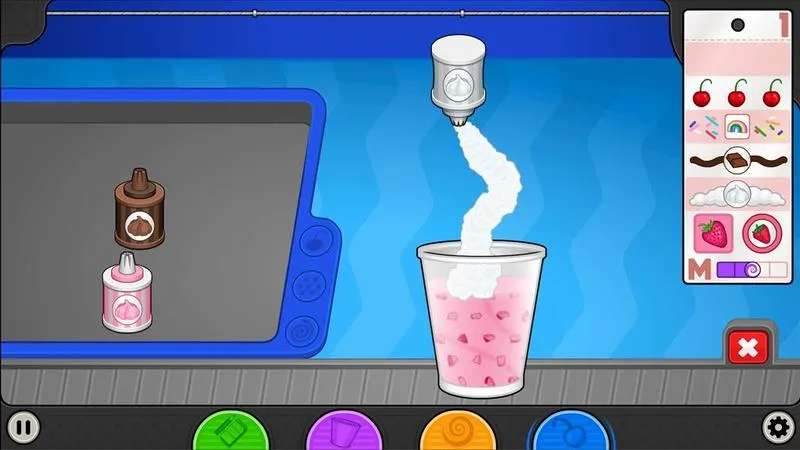
Papa’s Freezeria Deluxe PC focuses on fast-paced but relaxing time-management gameplay where attention to detail directly affects customer satisfaction. Each in-game day begins with customers placing unique orders that require specific ice cream flavors, mix-ins, syrups, whipped cream, and toppings. Players must carefully follow each order ticket while managing multiple stations, including the Build Station, Mix Station, and Top Station. The better you perform, the higher your tips and scores, allowing faster progression.
As the game advances, new customers arrive with more complex orders, demanding precision and timing. You’ll unlock new ingredients, upgrades, and decorations that help improve efficiency and customer patience. Seasonal themes add visual variety and fresh challenges, keeping the gameplay engaging even after many hours. The balance between speed and accuracy makes Papa’s Freezeria Deluxe on PC both accessible for beginners and satisfying for experienced players who aim for perfect scores.
Key Features
1. Classic Time-Management Gameplay with Modern Polish
Papa’s Freezeria Deluxe is built around a proven time-management formula that is easy to learn but challenging to master. Players juggle multiple tasks at once taking orders, preparing sundaes, mixing ingredients, and serving customers on time. The Deluxe edition refines this experience with smoother pacing and clearer visual cues, making it more beginner-friendly while still rewarding efficient multitasking and smart decision-making.
2. Multiple Interactive Work Stations
The game is divided into clearly defined stations such as the Build Station, Mix Station, and Top Station. Each station focuses on a specific part of the ice-cream-making process, teaching players how to follow orders step by step. This structure helps new players understand the workflow while gradually increasing complexity as more customers and ingredients are unlocked.
3. Deep Customization with Ingredients and Toppings
One of the biggest highlights is the wide variety of ice cream flavors, syrups, mixables, whipped creams, and toppings. As players progress, new ingredients become available, allowing for more creative and detailed sundaes. This variety keeps the gameplay fresh and encourages accuracy, as each customer has specific preferences that directly affect scores and tips.
4. Unique Customers with Individual Preferences
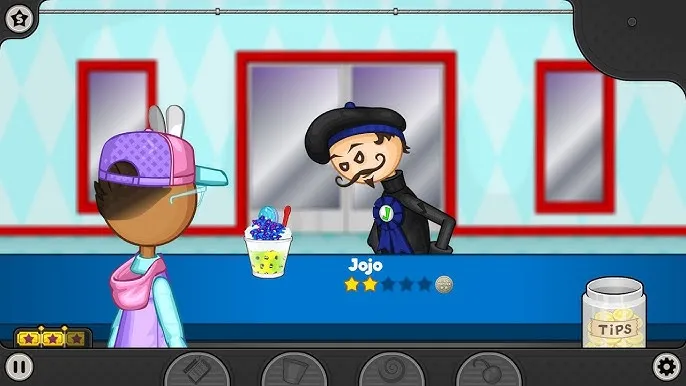
Each customer in Papa’s Freezeria Deluxe has distinct tastes, patience levels, and scoring expectations. Some care more about mixing accuracy, while others focus on toppings or presentation. Learning these preferences helps players prioritize tasks and improve customer satisfaction. This system adds depth and strategy, making every shift feel different.
5. Seasonal Events and Visual Themes
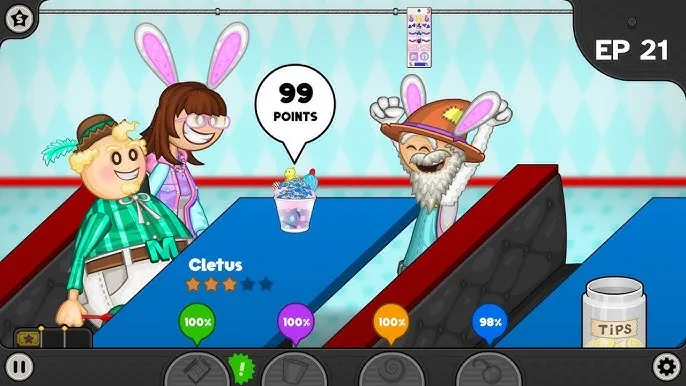
The game features seasonal changes that introduce themed decorations, ingredients, and customer outfits. These seasonal events not only add visual variety but also introduce new challenges and rewards. For new players, seasons provide clear progression milestones and a sense of long-term achievement as content unlocks over time.
6. Shop Upgrades and Progression System
Players can earn tips and points to upgrade equipment, improve waiting times, and decorate the shop. Upgrades directly affect gameplay by speeding up stations or increasing customer patience. This progression system teaches new players the importance of reinvesting earnings to handle tougher days and higher customer volumes more efficiently.
7. Optimized PC Experience with Smooth Controls
The PC version is optimized for keyboard and mouse controls, making dragging, mixing, and topping feel precise and responsive. The larger screen improves visibility, reducing mistakes during busy periods. Performance is stable even during longer sessions, making it ideal for players who enjoy relaxed but extended gameplay.
Why Play Papa’s Freezeria Deluxe on PC?
Playing Papa’s Freezeria Deluxe on PC delivers a noticeably smoother and more comfortable experience compared to mobile or browser-based versions. One of the biggest advantages is the larger screen, which makes every station easier to manage. Order tickets, ingredient placement, and customer queues are clearly visible, reducing mistakes during busy in-game days. The PC version also benefits from precise keyboard and mouse controls, allowing players to drag, mix, and top sundaes with greater accuracy. This level of control is especially helpful as orders become more complex and customer expectations increase. For players who enjoy efficiency and high scores, PC gameplay offers better consistency and responsiveness.
Another major reason players prefer Papa’s Freezeria Deluxe on PC is uninterrupted gameplay. Unlike mobile devices, there’s no battery drain, overheating, or performance throttling during long sessions. You can play for hours without worrying about charging cables or background app interruptions. The PC version is also ideal for multitasking—players can listen to music, watch videos, or follow guides while playing without affecting performance. Progress remains stable across sessions, and load times are fast, making the overall experience more relaxing and reliable. Whether you’re a casual gamer looking to unwind or a completionist aiming for perfect scores, the PC version provides the most polished, flexible, and enjoyable way to run your virtual ice cream shop.
How to Download Papa’s Freezeria Deluxe on PC
Here is a step by step guide to download Papa’s Freezeria Deluxe on PC;
- Find the button: Scroll to the “Download Papa’s Freezeria Deluxe for PC” button on this page.
- Start the safe download: Click the button to begin the safe download from this page. When prompted, choose Save (not Open) and pick a familiar folder (e.g., Downloads).
- Locate the file: When the download finishes, open your Downloads folder and find the .zip (or .rar) archive.
- Extract the game: Right-click the archive → Extract All… (or use 7-Zip/WinRAR) → choose a destination folder
- Open the folder: Go to the extracted folder and look for Papa’s Freezeria Deluxe .exe
- Launch the game: Double-click the .exe to start. If Windows SmartScreen appears, select More info → Run anyway (only if you downloaded from the button on this page).
- Set up controls & video: In the Options/Settings menu, choose your resolution/fullscreen, adjust audio latency, and confirm keyboard bindings (← → ↑ ↓).
- Create a shortcut (optional): Right-click Papa’s Freezeria Deluxe .exe → Send to → Desktop (create shortcut) for quick access.
- Play & enjoy: Start Story Mode or Free Play, and you’re good to go!
How to Play Papa’s Freezeria Deluxe on PC
Playing Papa’s Freezeria Deluxe on PC is simple to learn, even for first-time players, thanks to its clear tutorials and intuitive controls. After launching the game, you’ll select or create your character and begin working in your own ice cream shop. Each workday starts with customers placing orders that appear on detailed order tickets. These tickets show exactly what the customer wants, including ice cream flavor, mixables, blending level, syrups, whipped cream, and toppings. Using your mouse, you’ll drag ingredients into place and follow the order step by step across different stations. The game is designed to gradually introduce new mechanics, so beginners can comfortably learn the flow without feeling overwhelmed.
As you progress, mastering time management becomes the key to success. Customers will arrive more frequently and expect faster service, so you’ll need to prioritize tasks carefully. Pay attention to customer patience meters and complete orders in the correct sequence to avoid penalties. Upgrading equipment helps speed up stations, while shop decorations and bonuses increase customer satisfaction. Keyboard and mouse controls on PC make multitasking easier, allowing you to quickly switch between stations and handle multiple orders at once. The goal is to earn high scores, collect tips, unlock new ingredients, and build strong relationships with customers. With practice, you’ll develop efficient routines that help you run the shop smoothly, achieve perfect scores, and fully enjoy the relaxing yet rewarding gameplay loop that Papa’s Freezeria Deluxe offers on PC.
System Requirements
Minimum Requirements
- OS: Windows 7 or later
- Processor: Dual-Core CPU
- RAM: 2 GB
- Graphics: Integrated graphics
- Storage: 500 MB available space
Recommended Requirements
- OS: Windows 10 / 11
- Processor: Quad-Core CPU
- RAM: 4 GB or more
- Graphics: Dedicated or modern integrated GPU
- Storage: 1 GB available space
FAQ
Is Papa’s Freezeria Deluxe available on PC?
Yes, Papa’s Freezeria Deluxe is officially available on PC and offers a complete Deluxe experience. The PC version includes all seasonal content, ingredients, customers, and upgrades found in the Deluxe edition. Compared to older browser versions, the PC release runs more smoothly, supports higher resolutions, and provides more comfortable controls for longer play sessions.
Can I play Papa’s Freezeria Deluxe offline on PC?
Yes, once the game is downloaded and installed on your computer, it can be played fully offline. An internet connection is only required for the initial download or updates, depending on the platform you use. Offline support makes the PC version ideal for relaxed gaming without interruptions, even when you’re traveling or have limited internet access.
Is Papa’s Freezeria Deluxe suitable for kids and beginners?
Absolutely. The game is family-friendly and designed to be accessible for players of all ages. It features step-by-step tutorials, simple controls, and a gradual difficulty curve that helps beginners learn at a comfortable pace. There is no violent or inappropriate content, making it a safe and enjoyable choice for younger players and casual gamers alike.
Does the PC version have all Deluxe features and updates?
Yes, the PC version includes all Deluxe-exclusive features such as new ingredients, additional customers, seasonal events, customizable shops, and performance improvements. Players get the full, updated experience without missing any content, ensuring long-term replay value and consistent progression.
What controls are used to play Papa’s Freezeria Deluxe on PC?
The game is optimized for keyboard and mouse controls. Players mainly use the mouse for dragging ingredients, mixing ice cream, and adding toppings, while the keyboard helps with quick navigation and efficiency. This control setup offers better precision than touch controls, especially during busy shifts with multiple orders.
How long does it take to complete Papa’s Freezeria Deluxe on PC?
Completion time varies depending on playstyle. Reaching later levels and unlocking most content can take 15–25 hours, while fully completing the game earning high ranks, badges, and perfect customer scores—can take significantly longer. The progression system encourages replayability and steady improvement.
Is Papa’s Freezeria Deluxe available on Steam?
Yes, the game is available on Steam, where players can download it easily and receive updates. The Steam version may also include achievements and cloud-saving features, making it convenient for PC gamers who want a polished and reliable platform experience.
Alternatives to Papa’s Freezeria Deluxe on PC
- Papa’s Pizzeria Deluxe – Focuses on pizza-making with similar time-management mechanics.
- Cook, Serve, Delicious! – A more intense restaurant simulation with faster pacing.
- Overcooked – Cooperative cooking chaos with multiplayer support.
- Diner Dash – Classic restaurant management with fast customer service gameplay.
- Good Pizza, Great Pizza – Relaxing food simulation centered around pizza crafting.
Conclusion
Papa’s Freezeria Deluxe PC is a perfect blend of relaxing gameplay, creative expression, and rewarding progression. With enhanced visuals, smooth controls, and deep customization, it stands as the best way to experience this beloved time-management classic. Whether you’re a longtime fan or a new player, the PC version offers comfort, precision, and hours of engaging fun. A safe download button is available in this article, making it easy to jump in and start serving delicious frozen treats today.